The Pain Cave
What a Zwift Setup Actually Costs
The trainer is the line everyone budgets for. The subscription, the screen, the fan, the cassette and the mat are the lines that quietly double the number — here is the whole list.
The short answer
Quick picks
| # | Product | Best for | Score | Price |
|---|---|---|---|---|
| 1 | 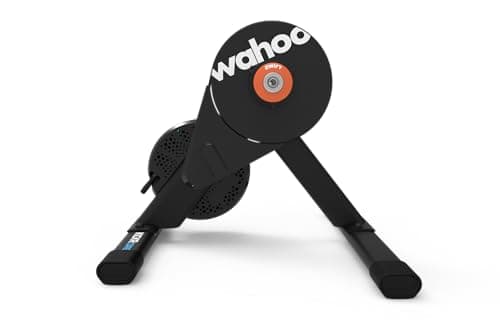 Wahoo Kickr Core 2 Spend the money here first. Everything else in a Zwift setup is cheap by comparison, and the trainer is the part you will not want to replace. | The trainer line item | 9.09.0 out of 10 | $549.99 · View on Amazon #ad We may earn a commission · Price as of October 22, 2026 |
| 2 | 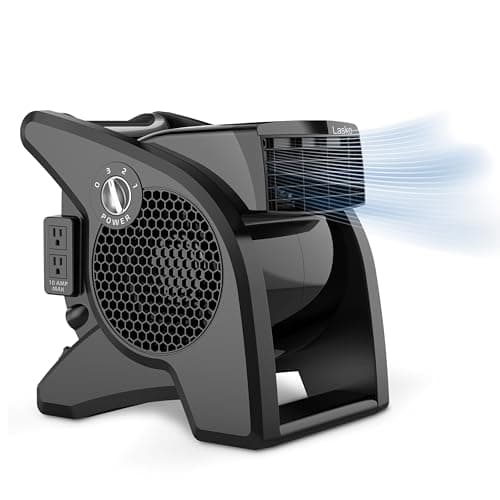 Lasko U15617 High Velocity Fan The highest-return purchase in indoor cycling per pound spent. Budget for it in the first round, not after the first hot session. | The line people skip and regret | 8.98.9 out of 10 | $93.99 · View on Amazon #ad We may earn a commission · Price as of October 22, 2026 |
| 3 | 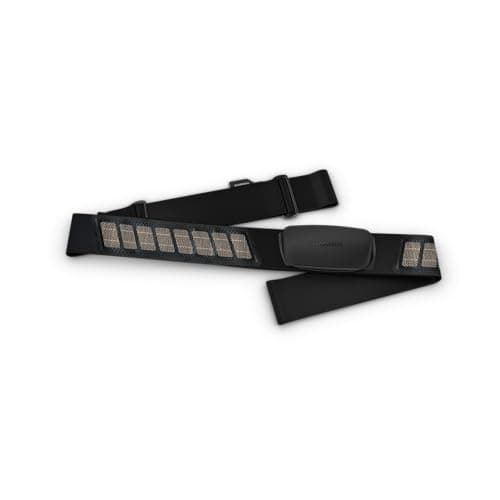 Garmin HRM-Dual The cheapest way to add a second dimension to your data. Worth including if the budget stretches, worth cutting first if it does not. | The optional line worth taking | 9.09.0 out of 10 | $59.95 · View on Amazon #ad We may earn a commission · Price as of October 22, 2026 |
Almost every "how much does Zwift cost" answer online gives you two numbers — the subscription and a trainer — and then stops. That is how people end up with a trainer in a hot room, no fan, a phone propped against a water bottle, and a nagging sense that they have been misled.
This page lists every line, including the ones that are easy to forget, and then assembles three honest builds: the minimum that genuinely works, the one most people should buy, and the one where you stop wanting to change anything. Prices move constantly and this site only ever shows live retailer prices rather than stale numbers, so what follows is the structure of the spend and the relative weight of each item.
The two costs you cannot avoid
The subscription. Zwift publishes US pricing at $19.99 a month or $199.99 a year, so the annual option saves roughly two months. Take the monthly plan for your first winter — if indoor riding turns out not to suit you, that is a much cheaper way to find out. Switch to annual in your second season, once you know. It is also worth pricing the alternative before you commit: Zwift vs Rouvycompares the two on subscription cost as well as content, and Rouvy's annual plan and its multi-rider tiers both undercut Zwift.
The trainer. This is the biggest line and the one that decides everything about the experience. Our smart trainer cost guide breaks the tiers down properly; in summary, wheel-on trainers are the cheapest way in and direct-drive units are where indoor riding stops feeling like a compromise. If you can stretch to direct drive, do — it removes tire wear, tire pressure and most of the noise in one purchase, as our direct drive vs wheel-on comparison explains.
The costs people forget
These are the lines that turn a trainer purchase into a setup, listed roughly in the order you will wish you had bought them.
A fan. Not optional in any meaningful sense. Indoors you lose the airflow that carries your heat away outdoors, so your core temperature climbs, your heart rate drifts upward at a fixed wattage, and the ride becomes harder for reasons unrelated to fitness. A high-velocity fan is a small fraction of the trainer price and changes more about how an hour feels than anything else you can buy. The fan roundup covers the options, including the smart ones.
A mat. Cheap, and it solves three problems at once: it protects the floor from sweat, which is corrosive; it damps vibration into the structure, which is what your neighbors actually hear; and it stops the trainer walking across the room. See our trainer mat roundup.
A cassette. The one that genuinely catches people out. Direct-drive trainers need a cassette, and it must match your chain — an 11-speed chain on a 12-speed cassette shifts badly and wears fast. Some trainers include one, some do not, and some ship in a Zwift Cog configuration that removes the question entirely in exchange for virtual shifting. Check which you are ordering and read our cassette guide first.
A screen and something to hold it. Zwift will run on a phone, and a phone is a poor experience. A tablet on a stand is the common answer; an old laptop or a TV with a streaming stick works well. A trainer desk solves the screen, the drink and the phone in one object, and our Zwift screen roundup prices the TV and monitor options against the size you actually need.
Possibly an ANT+ dongle. If you plan to run Zwift on a desktop or an older laptop, an ANT+ stick is a small cost that unlocks a far more reliable connection than Bluetooth — our ANT+ adapter guide covers when you need one. A trainer with onboard WiFi makes this moot.
Optional: a heart rate strap.Genuinely optional, genuinely useful, and cheap. It is the number that tells you what today's watts are costing you.
Optional: a sweat net and a towel. Trivial money. Indoor sweat is far more concentrated on a bike than anything outdoor riding produces, and it lands directly on your headset and stem bolts. Our accessories checklist is the full list.
| Minimum that works | What most people should buy | Stop-upgrading setup | |
|---|---|---|---|
| Trainer | Wheel-on smart trainer | Direct drive with WiFi | Flagship or moving trainer |
| Subscription | Zwift monthly | Zwift monthly, annual in year two | Zwift annual |
| Screen | Phone or existing tablet | Tablet on a stand | TV or dedicated monitor |
| Fan | Any high-velocity fan | High-velocity fan | Smart fan or two fans |
| Mat | Yes | Yes | Yes |
| Cassette | Not needed | Needed unless included | Needed unless virtual shifting |
| Trainer tire | Yes — wheel-on wears road tires | Not needed | Not needed |
| Heart rate | Skip | Budget ECG strap | Premium strap with HRV |
| ANT+ dongle | If desktop | Only if no WiFi | Not needed |
| Desk or table | Improvise | Trainer desk | Trainer desk |
Where the money is best spent
If your budget is fixed — and everyone's is — the order of priority is not the order of price.
First, direct drive over everything else. The single largest jump in indoor cycling quality is from tire-on-drum to direct drive. It is quieter, it does not wear a tire, it removes tire pressure as a variable that silently changes your power readings, and it feels vastly better. If the choice is a wheel-on trainer plus accessories versus a direct-drive trainer and improvising the rest for a month, take the direct drive.
Second, the fan. Before the screen, before the desk, before the heart rate strap. This is the purchase riders consistently say they should have made sooner.
Third, connectivity. A trainer with WiFi, or an ANT+ dongle if not. The most common reason people give up on Zwift in the first month is not fitness or boredom — it is twenty minutes of failed pairing before every ride. Our troubleshooting guide exists because this is so common, and most of it is avoidable by spending correctly once.
Last, accuracy. Paying up from a ±2.5% trainer to a ±1% one is the least valuable upgrade on this list for most riders, because training runs on repeatability rather than absolute truth. Our accuracy guide makes that case properly, and it is the argument that saves people the most money.
What you do not need to buy
A cadence sensor, if you have a smart trainer — the trainer already reports it, and it is usually just unpaired in the app. Our cadence sensor review covers how to check.
A power meter, if you have a smart trainer. The trainer is measuring power. A separate meter is only worth it if you also ride outdoors and want one device measuring both — see smart trainer vs power meter.
A steering device, a climb simulator or a rocker plate, at least at first. All three are genuinely good and all three are the sort of thing you buy in your second or third season, not your first — the pain cave setup ideas page is where that conversation belongs.
A second bike, unless mounting and dismounting genuinely stops you riding. Most people manage fine with one, and a riser block plus a routine makes the swap a two-minute job.
The running costs nobody mentions
The subscription is the obvious one. The less obvious ones are small, real and recurring: chain wear, because indoor riding is high-torque with no coasting; sweat-related corrosion on anything you fail to wipe down; trainer tires if you run a wheel-on unit, which our trainer tire guide covers; and the electricity, which for a trainer that plugs in is genuinely marginal but not zero.
Set against that, indoor riding costs you nothing in tires, brake pads, drivetrain contamination or weather-related kit, so the honest accounting is closer to neutral than it first looks.
Putting it together
The build most people should make is a direct-drive trainer with WiFi, a monthly Zwift subscription, a high-velocity fan, a mat, whatever screen you already own, and a cassette if the trainer needs one. That is a setup you can ride happily for years without wanting to change anything except the software.
If the number is still too high, read Zwift setup on a budget, which builds the cheapest version that is still worth riding. If you want to know what the top of the market buys, the best indoor cycling setup goes the other way. And if you have not chosen a trainer yet, start with the best trainer for Zwift.
Ready to buy the biggest line item?
See the best trainers for ZwiftThe full reviews
Every pick, in detail
#1 · The trainer line item
Wahoo Kickr Core 2
9.09.0 out of 10#ad We may earn a commission · Price as of October 22, 2026
Spend the money here first. Everything else in a Zwift setup is cheap by comparison, and the trainer is the part you will not want to replace.
- Role in the budget
- The largest single line, by a distance
- Claimed accuracy
- ±2%
- Max resistance
- 1,800 W
- Flywheel
- 5.4 kg
- Connectivity
- WiFi, Bluetooth, ANT+ FE-C
- Cassette
- Version dependent — check before ordering
What we'd praise
- Onboard WiFi removes the connection problems that cost most people their first month of Zwift
- Direct drive, so the tire and its pressure stop being variables
- ±2% is accurate enough that your FTP and zones mean something
- The tier where you stop wanting to upgrade, which is what makes it good value rather than cheap
What we'd flag
- The single biggest cost in the build
- Does not fold, so it needs a permanent floor position
- You still have to budget for the fan, the mat and the screen
If you do one thing with your budget, buy a trainer you will keep. A direct-drive unit with WiFi and a claimed ±2% is where the upgrade urge stops for most riders, and it is a fraction of the flagship price. Full detail in our Kickr Core 2 review.
#2 · The line people skip and regret
Lasko U15617 High Velocity Fan
8.98.9 out of 10#ad We may earn a commission · Price as of October 22, 2026
The highest-return purchase in indoor cycling per pound spent. Budget for it in the first round, not after the first hot session.
- Role in the budget
- Small cost, enormous effect
- Type
- High-velocity pivoting blower
- Why it matters
- Sweat evaporation, not air temperature
- Placement
- Chest height, aimed at your torso
- Alternative
- Any high-velocity fan of similar output
- Priority
- Buy before the screen
What we'd praise
- The cheapest thing you can buy that makes an indoor hour meaningfully less awful
- Genuine airflow rather than the gentle circulation a domestic fan produces
- Pivots, so you can aim it at your chest rather than your knees
- Costs a small fraction of the trainer and changes more about how the ride feels
What we'd flag
- Loud, in the way that anything moving real air is loud
- Bulky and it takes floor space in a room that may not have much
- Not a smart fan — no automatic speed control from your heart rate
Riding indoors removes the 30 km/h of airflow that carries your heat away outdoors. Your core temperature climbs, your heart rate drifts up at a fixed wattage, and the session gets harder for reasons that have nothing to do with fitness.
A high-velocity fan fixes that more effectively than any other purchase. Our fan roundup ranks the options.
#3 · The optional line worth taking
Garmin HRM-Dual
9.09.0 out of 10#ad We may earn a commission · Price as of October 22, 2026
The cheapest way to add a second dimension to your data. Worth including if the budget stretches, worth cutting first if it does not.
- Role in the budget
- Small, optional, genuinely useful
- Measurement
- ECG chest strap
- Battery
- CR2032, up to 3.5 years
- Connectivity
- ANT+ and Bluetooth
- Why bother
- Tells you what today's watts are costing you
- Alternative
- None — skip it rather than buy a wrist optical sensor
What we'd praise
- Cheapest strap worth owning, and it uses the same ECG measurement as premium options
- Three and a half years on a coin cell, so it never needs managing
- Unlimited simultaneous ANT+ connections, which suits a room with several devices
- Adds the one number a trainer cannot give you
What we'd flag
- Genuinely optional — Zwift works fine without it
- It is a chest strap, and some people will not wear one
- No onboard memory, so a receiving device has to be present
Power tells you how much work you are doing. Heart rate tells you what that work is costing you today — after a bad night, in a hot room, on the third hard day in a row. It is the number that explains why an easy session feels hard.
Full detail in our Garmin HRM-Dual review.
Good questions
Frequently asked questions
How much does a Zwift subscription cost?
Zwift lists US pricing at $19.99 per month or $199.99 per year, so the annual plan saves roughly two months. Taking the monthly option for a first winter is sensible — if indoor riding turns out not to suit you, that is a much cheaper way to find out.
What do you actually need to run Zwift?
Two things are unavoidable: a trainer and the subscription. In practice a fan and a mat are also required rather than optional, and a direct-drive trainer needs a cassette unless one is included or it uses a Zwift Cog. Everything else — heart rate strap, desk, ANT+ dongle — depends on your setup.
Can you run Zwift on a phone?
Yes, and it works. It is also a poor experience: the screen is small, the graphics are reduced, and reading numbers mid-interval is hard. A tablet on a stand, an old laptop or a TV with a streaming stick is a large improvement for very little money, especially if you already own one.
What is the most commonly forgotten cost in a Zwift setup?
The cassette. Direct-drive trainers need one, it must match your chain's speed count, and it is not always included. After that it is the fan — not because people do not know fans exist, but because they underestimate how much difference one makes until the first hot session.
Is a wheel-on trainer enough for Zwift?
It works, and plenty of people start there. What you give up is quietness, tire life, and consistency — tire pressure and how hard the roller is clamped both change your power readings. If your budget can stretch to direct drive, that single upgrade improves the experience more than anything else on the list.
Do I need a heart rate monitor for Zwift?
No. Zwift runs entirely on power, and a smart trainer supplies that. A strap adds a second dimension — what today's watts are costing you — which is genuinely useful for pacing and for spotting fatigue. It is cheap, and it is the right thing to cut first if the budget is tight.
How we sourced this
- Zwift pricing FAQ — membership costs (official)
- Zwift support: supported trainers, sensors and connection requirements
- Wahoo indoor cycling trainers, specifications and features (manufacturer)
- Garmin Tacx indoor trainers, range and specifications (manufacturer)
- Elite home trainer range and specifications (manufacturer)
Keep going