Head to Head
Zwift vs Rouvy
Same monthly price, opposite ideas. One builds a virtual world with thousands of riders in it; the other films real roads and puts you on them. Which is right depends on why you ride indoors.
The short answer
Quick picks
| # | Product | Best for | Score | Price |
|---|---|---|---|---|
| 1 | 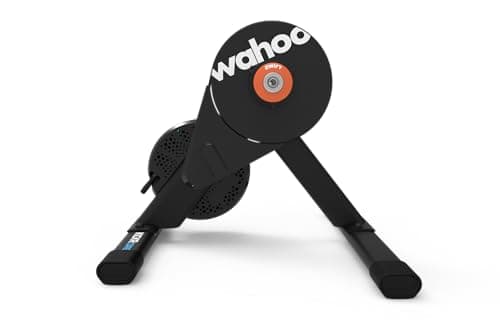 Wahoo Kickr Core 2 The trainer that makes the platform choice reversible: WiFi, Bluetooth and ANT+ FE-C, so nothing about it ties you to one subscription. | Best trainer for either platform | 8.98.9 out of 10 | $549.99 · View on Amazon #ad We may earn a commission · Price as of October 6, 2026 |
| 2 | 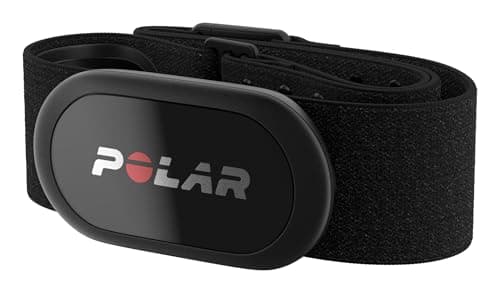 Polar H10 Dual Bluetooth, ANT+ and session memory — the strap least likely to make you choose between the app and your watch. | Best heart rate strap for either app | 9.39.3 out of 10 | $104.95 · View on Amazon #ad We may earn a commission · Price as of October 6, 2026 |
| 3 | 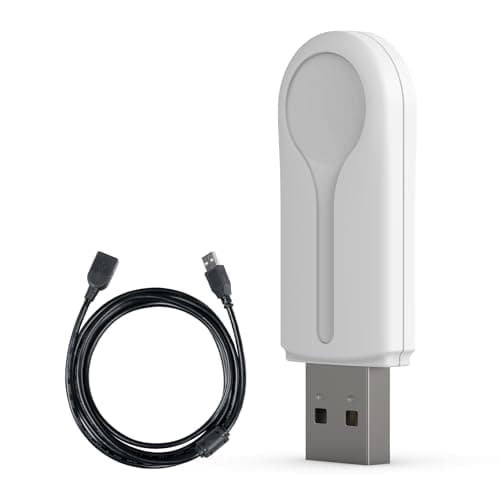 CYCPLUS ANT+ USB Receiver Stick On a laptop or desktop, the cheapest fix for the connection problems that make people blame the app. | Best fix for dropouts on a PC or Mac | 8.58.5 out of 10 | $16.99 · View on Amazon #ad We may earn a commission · Price as of October 6, 2026 |
Zwift and Rouvy are both subscription apps that take control of your smart trainer, adjust the resistance to match a route, and give you something to look at while you suffer. That is where the similarity ends. Zwift renders a video game world and fills it with other riders. Rouvy films real roads and overlays your avatar on the footage. Everything that follows comes out of that single difference.
If you are still choosing hardware rather than software, start with the best trainer for Zwift — the same trainers control Rouvy, because both platforms use the same open protocols. If you want the structured-training comparison instead, our Zwift vs TrainerRoad page covers the app that competes on plans rather than scenery.
Price: identical monthly, Rouvy cheaper annually
| Zwift | Rouvy | |
|---|---|---|
| Monthly | $19.99 | $19.99 (Single) |
| Annual | $199.99 | $179.99 (Single) |
| Two riders | No multi-rider tier | Duo: $29.99/mo or $249.99/yr |
| Up to five riders | No multi-rider tier | Group: $59.99/mo or $499.99/yr |
| Free trial | 14 days, per Zwift's pricing page | 7 days, all plans |
| Free tier | No | Yes, 20 km per month |
| Pause option | Not published as a feature | 180-day pause |
Monthly, there is nothing to choose: both ask $19.99. Annually, Rouvy's Single plan is $179.99 against Zwift's $199.99, and Rouvy also publishes loyalty discounts on its pricing page for long-term subscribers, without a fixed published schedule.
Two features in that table deserve more attention than the headline price. The first is Rouvy's multi-rider plans: a Duo plan at $29.99 a month covers two riders, where two Zwift riders in one household need two full memberships. For a couple who both ride, that is the single biggest cost difference between the platforms. The second is Rouvy's free tier — 20 km a month, which is not a training plan but is enough to confirm your trainer pairs and the app runs on your hardware before any money changes hands.
Neither subscription is the expensive part of indoor riding, and our what a Zwift setup really costs page does the full arithmetic: the hardware dwarfs the software, which is why the app is the easiest thing to change your mind about.
The core difference: a rendered world against a filmed road
Zwift builds virtual worlds. Watopia and its rotating guest worlds are game environments with invented roads, and the appeal is that they are populated: other riders are visible and moving around you, all the time, and the drafting and the racing are built on that.
Rouvy records reality. BikeRadar's guide puts the library at over 1,300 augmented-reality routes plus thousands of standard point-of-view video courses, totaling around 245,697 km of road. The augmented-reality routes composite your avatar and other riders onto real footage, matched to the real elevation profile, so the gradient your trainer applies corresponds to a slope that physically exists.
That has a concrete consequence rather than just an aesthetic one. If you have an event in the calendar — a sportive, a gran fondo, an Ironman bike leg, a climb you are flying to — Rouvy can put you on that course, with its real gradients, months in advance. Zwift cannot, and does not pretend to. In the other direction, a rendered world gives Zwift something Rouvy cannot reproduce: consistency. Every Zwift rider knows what the Alpe climb feels like, which is what makes shared segments, routes and races comparable.
One honest caveat on the video format: real footage is captured once, at one speed, in one weather, and when your speed diverges from the capture the result is a less fluid picture than a rendered world. If you are picking a platform on graphical polish alone, the comparison is less one-sided than "real video" suggests.
Racing and group riding
This is Zwift's category and it is not close. Zwift's scale means races, group rides and events run continuously, at every hour, at every ability level. If you want to be pinned to your limit by a stranger from another continent on a Wednesday night, this is the platform that delivers it on demand.
Rouvy is not empty, though, and the comparison is often made lazily. BikeRadar reports around 100 official events a week, rising above 150 in winter, with monthly Big Rouvy Races drawing thousands and pro-rider events drawing several thousand more. It also runs a gamified Career system with 80 levels, experience points and avatar customization, which is Rouvy's answer to the progression loop that keeps Zwift riders logging in.
The practical test: if you would ride a race within an hour of deciding to, Zwift. If you would put a monthly event in your calendar and build towards it, Rouvy is sufficient.
Structured training
Both platforms run structured workouts in ERG mode, holding your target watts regardless of gear, and both ship training plans. BikeRadar counts 291 official Rouvy workouts built by coaches and users, with custom interval building, plus TrainingPeaks integration for riders whose plan lives outside the app.
Neither is a dedicated training platform, and we would not pick either on that basis. If structure is your priority, read Zwift vs TrainerRoad, because TrainerRoad is built around the plan rather than the scenery. What both Zwift and Rouvy do well is make a hard session survivable, which is a genuine training benefit: our FTP improvement guide is blunt that the best plan is the one you finish, and after an FTP test either platform will set your zones from the result.
Software sorted?
Build the pain cave around itDevices, trainers and the connection question
Both platforms run on Windows, macOS, iOS, Android and Apple TV, and both control any trainer that speaks the standard protocols — which, in practice, means every current smart trainer and every smart bike. Zwift lists the Zwift Ride itself as compatible with Rouvy as well as Zwift, which tells you how little the hardware cares.
The platform-independent gotcha is connections, not compatibility. Apple TV allows two Bluetooth device connections inside the app (technically three, with one taken by the remote), which is where a trainer, a heart rate strap and a cadence sensor start fighting. The fix is the same on both platforms: move sensors to ANT+ on a PC or Mac, or relay heart rate through a trainer that supports it. Our ANT+ vs Bluetooth guide covers the detail, and when your trainer will not connect is the troubleshooting order.
If you ride on a tablet or a TV, the screen is worth more thought than the subscription: the best tablet for Zwift and the best TV for Zwift both apply equally to Rouvy, because the hardware requirements are the same.
Two things we are not going to claim
We are not going to tell you one platform "feels" more accurate than the other. Both read the same watts from the same trainer; what differs is how the gradient is scaled and how the physics convert your power into speed, and that is a design choice rather than a measurement error. If your numbers matter, they come from the hardware — see how accurate smart trainers are.
And we are not going to put a number on route counts as though they were comparable. Rouvy publishes a route library an order of magnitude larger than Zwift's, which is a real difference, but Zwift's smaller set is ridden by vastly more people simultaneously. One platform optimizes variety, the other optimizes density. Both counts are honest and neither settles the argument.
The verdict
Pick Zwift if your indoor riding is social or competitive. The population is the product, nothing else comes close on racing availability, and the structured side is good enough that most riders never need a second subscription.
Pick Rouvy if you ride indoors to prepare for somewhere specific, if real scenery keeps you on the bike longer than a rendered one, or if there are two or more riders in your house — the Duo and Group plans make it meaningfully cheaper than two Zwift memberships, and the annual Single plan already undercuts Zwift by twenty dollars.
The low-risk answer, given both offer a trial and Rouvy offers 20 km a month free: run Rouvy's free tier on the hardware you own, take Zwift's 14-day trial in the same fortnight, and let your own motivation decide. The trainer underneath works identically for both, which is the whole reason this is a cheap experiment.
The full reviews
Head to head
#1 · Best trainer for either platform
Wahoo Kickr Core 2
8.98.9 out of 10#ad We may earn a commission · Price as of October 6, 2026
The trainer that makes the platform choice reversible: WiFi, Bluetooth and ANT+ FE-C, so nothing about it ties you to one subscription.
- Type
- Direct drive, electromagnetic
- Claimed accuracy
- ±2%, measured
- Max resistance
- 1,800 W
- Max gradient
- 16% up, -10% down
- Connectivity
- WiFi, Bluetooth, ANT+ FE-C
- Flywheel
- 5.4 kg (12 lb)
What we'd praise
- WiFi, Bluetooth and ANT+ FE-C, so both Zwift and Rouvy can control it from any host device
- Measured rather than estimated power at a claimed ±2%, which keeps your numbers portable between platforms
- Kickr Bridge relays a heart rate strap through the trainer, freeing a Bluetooth channel on Apple TV
- Zwift Cog and Click version available, so virtual shifting works without a cassette
What we'd flag
- Fixed frame: no folding legs, no carry handle
- 1,800 W and 16% are mid-tier ceilings, which heavier riders on steep climbs will notice
- Accuracy is unchanged from the original Kickr Core, so this is a connectivity update
Whichever app wins your money, the hardware requirement is the same: a trainer the app can control. The Core 2 covers every route into both platforms — WiFi, Bluetooth and ANT+ FE-C — and measures power rather than estimating it, so an FTP set on one platform means the same thing on the other.
Our Kickr Core 2 review covers it in detail, and the full trainer ranking has the alternatives at every price.
#2 · Best heart rate strap for either app
Polar H10
9.39.3 out of 10#ad We may earn a commission · Price as of October 6, 2026
Dual Bluetooth, ANT+ and session memory — the strap least likely to make you choose between the app and your watch.
- Type
- Chest strap, ECG electrodes
- Bluetooth
- Two simultaneous connections
- ANT+
- Yes
- Battery
- Coin cell, up to 400 hours
- Onboard memory
- Yes, one session
- Water resistance
- WR30
What we'd praise
- Two simultaneous Bluetooth connections plus ANT+, so the app and a watch or head unit can both read it
- ANT+ lets a Windows or Mac setup take heart rate off the Bluetooth stack entirely
- Onboard memory keeps the session if the pairing drops mid-ride
- Up to 400 hours on a replaceable coin cell, and WR30 water resistance
What we'd flag
- The most expensive strap we recommend
- A chest strap has to be damp to read cleanly from the first minute
- Dual Bluetooth does not raise Apple TV's own two-channel limit, which is the host's constraint
Both platforms use heart rate the same way, and both will drop a strap mid-session if the Bluetooth stack is crowded. The H10 solves that twice over: two simultaneous Bluetooth connections, and ANT+ as an escape route on a PC or Mac.
Our Zwift heart rate monitor roundup explains the connection-limit problem properly, and the H10 review covers the strap on its own.
#3 · Best fix for dropouts on a PC or Mac
CYCPLUS ANT+ USB Receiver Stick
8.58.5 out of 10#ad We may earn a commission · Price as of October 6, 2026
On a laptop or desktop, the cheapest fix for the connection problems that make people blame the app.
- Protocol
- ANT+
- Connection
- USB-A
- In the box
- 3 m extension cable
- Platforms
- Windows and macOS
- Works with
- Trainers, power meters, HR straps, cadence sensors
What we'd praise
- ANT+ is a broadcast protocol, so one dongle reads unlimited sensors with no pairing queue
- The 3 m cable gets the receiver next to the bike instead of behind a desktop
- Moves heart rate, cadence and power off Bluetooth, which is the usual cause of mid-ride dropouts
- Cheap enough to be the first thing you try
What we'd flag
- Does nothing for Apple TV, iPad or iPhone — none of those have an ANT+ path
- USB-A, so a modern laptop may need an adapter
- ANT+ only: no help for a Bluetooth-only sensor
A surprising share of "this platform is buggy" complaints are Bluetooth channel problems rather than software problems, and they look identical from the saddle. If you run either app on Windows or macOS, a dongle moves your sensors to ANT+ and the queue disappears.
Our ANT+ vs Bluetooth guide explains which setups benefit, and the adapter roundup ranks the dongles.
Good questions
Frequently asked questions
Is Rouvy cheaper than Zwift?
Monthly they are the same: both list $19.99. Annually Rouvy is cheaper, at $179.99 for its Single plan against Zwift's $199.99. Rouvy also sells multi-rider plans - Duo at $29.99 a month or $249.99 a year for two riders, and Group at $59.99 a month or $499.99 a year for up to five - where Zwift has no multi-rider tier, so two riders in one house need two memberships. Figures checked on 2026-10-05.
What is the main difference between Zwift and Rouvy?
Zwift renders invented virtual worlds and fills them with other riders; Rouvy films real roads and overlays your avatar on the footage, matched to the real elevation profile. That means Rouvy can put you on a specific climb or event course that physically exists, while Zwift gives you a consistent shared world where racing and group riding happen continuously.
Does Rouvy have a free version?
Yes. Rouvy's pricing page lists a limited free tier with 20 km of riding per month plus access to challenges and events, and every paid plan starts with a 7-day free trial. Zwift's pricing page advertises a 14-day free trial but no permanent free tier. The free tier is a useful way to confirm your trainer pairs and the app runs on your device before paying.
Does Rouvy work with the same trainers as Zwift?
Yes. Both platforms control trainers over the standard protocols - Bluetooth FTMS and ANT+ FE-C - and Rouvy states it works with most smart bikes, smart trainers and classic trainers. Zwift even lists its own Zwift Ride smart bike as compatible with Rouvy. In practice any current smart trainer works on both, so the hardware decision does not lock you into a platform.
Can you run Rouvy on an Apple TV?
Yes, Rouvy runs on Apple TV as well as Windows, macOS, iOS and Android. The same Apple TV limitation applies on both platforms: the device allows two Bluetooth connections inside the app, technically three with one taken by the remote, so a trainer plus a heart rate strap plus a cadence sensor can run out of channels. Moving sensors to ANT+ on a computer, or relaying heart rate through a trainer that supports it, is the fix.
Which is better for structured training?
Neither is a dedicated training platform, and the gap between them is smaller than the gap to a plan-first app. Rouvy publishes 291 official workouts built by coaches and users, supports custom intervals and integrates with TrainingPeaks; Zwift ships workouts and plans of its own. Both hold target watts in ERG mode. If the training plan is your priority rather than the scenery, compare Zwift against TrainerRoad instead.
Does Rouvy have racing?
Yes, though not at Zwift's scale. BikeRadar reports around 100 official Rouvy events a week, rising above 150 in winter, with monthly Big Rouvy Races attracting thousands of riders. Rouvy also runs an 80-level Career progression system. Zwift's advantage is availability: races and group rides run continuously at every hour and ability level, so you never have to wait for one.
Can you subscribe to both Zwift and Rouvy?
You can, and some riders do, but at $19.99 each per month it is an expensive way to avoid a decision. A cheaper approach is to run Rouvy's free 20 km monthly tier alongside a Zwift membership, which keeps the real-road routes available for the occasional course rehearsal without a second full subscription.
How we sourced this
- ROUVY subscription plans and pricing (official)
- ROUVY features, route types and device support (official)
- In-depth Rouvy guide: routes, workouts, events and comparison with Zwift (BikeRadar)
- Zwift membership pricing and free trial (official)
- Rouvy subscription price increase to $19.99 / £17.99 per month (road.cc)
- Zwift Ride with KICKR CORE 2, listed platform compatibility (Zwift US store)
- Apple TV Bluetooth connection limit and the Companion workaround (Zwift Insider)
Keep going