Head to Head
Zwift vs MyWhoosh
One is the paid default with the busiest roads in indoor cycling. The other costs nothing at all — for now. Here is what the free app genuinely matches, and the one announcement that should temper the decision.
The short answer
Quick picks
| # | Product | Best for | Score | Price |
|---|---|---|---|---|
| 1 | 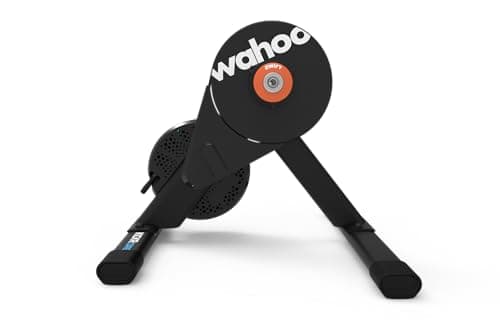 Wahoo Kickr Core 2 The trainer we would buy for either app: open protocols, onboard WiFi and a price that leaves the software decision reversible. | Best trainer for either platform | 8.98.9 out of 10 | $549.99 · View on Amazon #ad We may earn a commission · Price as of October 27, 2026 |
| 2 | 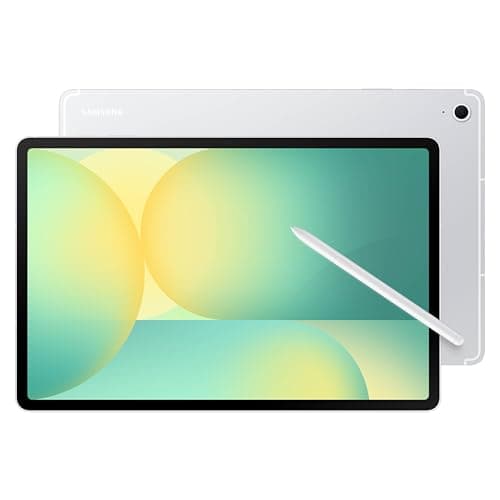 Samsung Galaxy Tab S10 FE, 128GB Wi-Fi The pragmatic way to try both: one sweat-rated Android screen with enough headroom that neither app is the limiting factor. | Best screen that clears both platforms' Android minimums | 8.88.8 out of 10 | $549.99 · View on Amazon #ad We may earn a commission · Price as of October 27, 2026 |
| 3 | 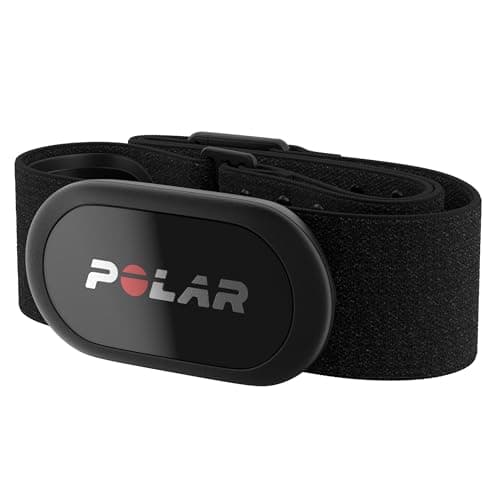 Polar H10 The strap that removes heart rate from the list of things that can go wrong, on either platform. | Best heart rate strap for either app | 9.09.0 out of 10 | $104.79 · View on Amazon #ad We may earn a commission · Price as of October 27, 2026 |
| 4 | 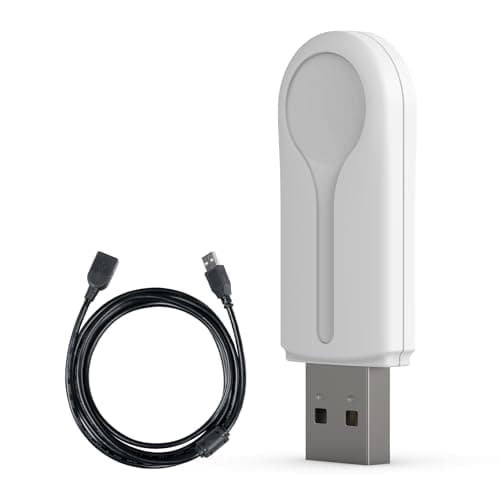 CYCPLUS ANT+ USB Receiver Stick If either app keeps dropping your trainer on a computer, this is the first thing to try and the cheapest thing on the site. | Best fix for dropouts on a PC or Mac | 9.29.2 out of 10 | $16.99 · View on Amazon #ad We may earn a commission · Price as of October 27, 2026 |
Zwift and MyWhoosh do the same mechanical job: take control of your smart trainer, change the resistance to match a route, and give you somewhere to look while you suffer. Both render a virtual world rather than filming real roads, which is what separates this comparison from Zwift vs Rouvy, and both compete on experience rather than on training science, which is what separates it from Zwift vs TrainerRoad.
So the question is narrow and unusually clean: what does Zwift's subscription buy that an app charging nothing does not give you?
Cost: the only row that is not close
| Zwift | MyWhoosh | |
|---|---|---|
| Membership fee | Paid subscription, monthly or annual | None advertised today |
| Tiers | One membership; annual or monthly billing | One app; a Season Pass is announced, not priced |
| Free trial | 14 days (per Zwift's pricing page title) | Not applicable — the app itself is free |
| Annual trial | No trial on annual plans | Not applicable |
| Annual refund window | Cancel within 30 days of signup for a refund | Not applicable |
| Free tier | No | Yes — this is the whole proposition |
We are deliberately not reprinting Zwift's dollar figures on this page, because Zwift's own pricing page renders them inside an image we cannot read reliably, and a stale subscription price is worse than no price. The current US figures, checked in October 2026, are in the pricing table on our Zwift vs Rouvy page, and what a Zwift setup really costs does the full arithmetic including hardware.
What we can say plainly: Zwift bills a recurring subscription with no permanent free tier, and MyWhoosh currently advertises no membership fee at all. Over a winter that difference is real money — and it is also smaller than the gap between two trainers, which is the point our setup-cost page keeps making. The software is the cheapest thing in a pain cave and the easiest to change.
The Season Pass, and why we are flagging it
MyWhoosh's own site promotes an upcoming Season Pass, including a brand-new world arriving with it, and does not publish what it will cost. We are not going to speculate about the number or about whether the base app stays free.
What we will say is how to make the decision robust to it. Do not buy hardware on the assumption that your software is permanently free, and do not let the saving decide a several-hundred-dollar trainer purchase. Because both apps use the same open protocols, the app is the one component you can swap in an evening without buying anything — so choose hardware on hardware grounds and treat the subscription question as reversible.
What Zwift's money actually buys
Population.This is the honest answer, and it is not a feature list. Zwift is where the riders are. A race that fills at an awkward hour, a group ride with enough people to hold a pace, a road that is busy when you happen to get on the bike — none of that can be written into a competitor's code, and all of it is what you notice within a week.
Power-ups and the race culture built on them.Zwift's racing has power-ups and years of accumulated etiquette, categories and events around them. Comparison write-ups consistently note that MyWhoosh has no power-ups. Whether that is a loss or a relief depends entirely on you — some riders consider them the best thing about Zwift racing and others consider them the reason they stopped.
Ecosystem maturity. Zwift has deeper integrations, a longer firmware and compatibility record with trainers, and a first-party hardware line — the Zwift Ride frame and the Cog and Click virtual shifting system. If you want virtual shifting, note that the Click officially works in Zwift only, which is a genuine lock-in worth understanding before you buy a Cog-equipped trainer. Our Zwift Cog vs cassette guide covers it.
What MyWhoosh matches
More than most paying Zwift riders assume. MyWhoosh's own site promotes structured training programs, a custom workout creator, beginner plans, and organized racing including Sunday Race Club and Supertri events with published results.
Mechanically it is the same proposition: a rendered world, routes, group events, resistance control over ANT+ and Bluetooth, and workouts you can start from its companion Link app. If your indoor riding is structured intervals and the occasional social hour, the free app is genuinely competing rather than approximating.
Where third-party comparisons disagree is on world and route counts, and we are not going to settle it with a number: the published figures vary between write-ups and between versions, and MyWhoosh's own site describes routes and a new world without giving a total. Install it and look, since that costs nothing.
Device requirements: the row people skip
This is where the two platforms genuinely diverge, and it is the most useful part of the comparison if you are trying to run either app on hardware you already own.
| Platform | Zwift | MyWhoosh |
|---|---|---|
| Windows | Published on Zwift's system requirements page | Windows 10 64-bit+, Core i3 6th gen or Ryzen 3 3000-class, 8GB RAM, 8GB free disk, Bluetooth 4.0+ |
| macOS | Published on Zwift's system requirements page | Intel i5 7th gen, 8GB RAM, 10GB free disk |
| iPhone / iPad | Supported device list published by Zwift | iOS 12+, 3GB RAM; iPhone XR/XS and later, 2018 iPad Pro and later |
| Android | Android 9.0+, Arm64, 3GB RAM, 4GB storage, OpenGL ES 3.0 | Android 10+, 3GB RAM, octa-core, Adreno 640 / Mali G76-MP10 class GPU, 2GB disk |
| Apple TV | Supported | Apple TV 4K 2nd generation (2021) and newer only |
Two practical conclusions. First, the Apple TV row is the one that catches people out: MyWhoosh supports only the Apple TV 4K from 2021 onward, so an older Apple TV that runs Zwift fine will not run MyWhoosh. If an Apple TV is your screen, check the generation before you plan around the free app — Zwift on Apple TV covers that setup and its Bluetooth channel limits.
Second, MyWhoosh asks for a specific GPU class on Android that Zwift does not, so a cheap tablet that clears Zwift's list is not automatically cleared for MyWhoosh. Both ask for 3GB of RAM as a floor, which is low enough that most tablets sold in the last few years qualify — our best tablet for Zwift roundup lists what we would actually buy, and every pick there clears both minimums.
Hardware: identical, which is the good news
Nothing in your pain cave needs to change to try the other app. Both platforms control trainers over ANT+ FE-C and Bluetooth, both read standard heart rate and cadence sensors, and neither requires proprietary hardware to function.
The one asterisk is virtual shifting. The Zwift Click officially shifts in Zwift only, so a Cog-equipped trainer ridden in MyWhoosh is effectively a single-speed unless you fit a cassette. If you expect to split your time, that is an argument for the cassette version — best cassettes for smart trainers covers the fitting, and how to set up a smart trainer walks the whole first-time process.
The verdict
Install MyWhoosh today. There is no cost and no commitment, it runs on the trainer you already own, and if it suits how you ride you have saved a subscription. Check the device requirements table above first, especially if your screen is an older Apple TV.
Then decide whether Zwift's population is worth paying for.If you race, if you ride in groups, or if what gets you on the bike is that the road is busy, it probably is. If you ride structured intervals alone and the scenery is just something to look at, it probably is not — and MyWhoosh is a much better free app than “free app” suggests.
Whatever you choose, do not let it decide your hardware. The trainer outlives the subscription by years, and both platforms speak the same protocols — which is why building the setup properly matters more than the app running on it.
Sorted the software?
Build the setup that runs either appThe full reviews
Head to head
#1 · Best trainer for either platform
Wahoo Kickr Core 2
8.98.9 out of 10#ad We may earn a commission · Price as of October 27, 2026
The trainer we would buy for either app: open protocols, onboard WiFi and a price that leaves the software decision reversible.
- Type
- Direct drive, electromagnetic
- Claimed accuracy
- Under ±2%
- Max resistance
- 1,800 W
- Max simulated grade
- 16%
- Connectivity
- WiFi, Bluetooth, ANT+ FE-C
- Works with
- Zwift, MyWhoosh and every other app
What we'd praise
- Broadcasts ANT+ FE-C and Bluetooth, which is what both platforms control a trainer with — the hardware is not the thing you choose between apps
- Onboard WiFi and Race Mode, so the connection does not depend on the device running the app
- Sensor bridging relays a heart rate strap through the trainer, freeing a Bluetooth channel on an Apple TV
- Sold in a Zwift Cog and Click version if you want virtual shifting without buying a cassette
What we'd flag
- Virtual shifting with the Click officially works in Zwift only — on MyWhoosh you would ride the Cog as a single gear or fit a cassette
- Under ±2% claimed rather than the ±1% of a flagship
- 1,800 W and a 16% grade ceiling
- No carry handle and no flexible feet
The useful thing about this whole comparison is that the hardware does not care. Both platforms control a trainer over the same open protocols, so a trainer bought for Zwift runs MyWhoosh and the other way round. That is why the app is the easiest part of an indoor setup to change your mind about.
The Core 2 is our pick because the 2026 generation added onboard WiFi, Race Mode and sensor bridging — the features that used to cost flagship money. The one app-specific caveat: virtual shifting with the Zwift Click officially works in Zwift only, so if you expect to spend real time in MyWhoosh, think about whether you want the Cog version or a cassette. Zwift Cog vs cassette covers that decision, and Kickr Core 2 vs Kickr v6covers whether to spend more inside Wahoo's range.
#2 · Best screen that clears both platforms' Android minimums
Samsung Galaxy Tab S10 FE, 128GB Wi-Fi
8.88.8 out of 10#ad We may earn a commission · Price as of October 27, 2026
The pragmatic way to try both: one sweat-rated Android screen with enough headroom that neither app is the limiting factor.
- Memory
- 8GB RAM, 128GB, microSD
- Durability
- IP68 rated
- MyWhoosh Android minimum
- Android 10+, 3GB RAM, 2GB storage
- Zwift Android minimum
- Android 9.0+, Arm64, 3GB RAM, 4GB storage
- Headroom
- More than double the RAM either app asks for
- Screen
- Full-size tablet panel
What we'd praise
- 8GB of RAM against a 3GB minimum on both platforms, so neither app is near the limit
- IP68 rated, which matters more than any spec on a screen that lives in a sweaty room
- One screen runs both apps, so you can try the free platform without buying anything
- microSD expansion, so storage is not the thing that forces an upgrade
What we'd flag
- Android builds of both apps have historically had less polish than iOS
- Check the Play Store shows each app as compatible on your exact unit before relying on it
- Zwift must be installed from the primary user profile on Android — a shared family tablet needs care
- A tablet is the smallest screen in this comparison; a TV is a better place to race
If you want to ride both platforms before committing, a tablet is the cheapest way to do it. MyWhoosh publishes an Android minimum of Android 10 or later, 3GB of RAM, an octa-core processor and 2GB of free storage; Zwift asks for Android 9.0 or higher, an Arm64 chip, 3GB of RAM and 4GB of storage. This tablet clears both with room to spare.
The IP68 rating is the specification we would not compromise on for a pain cave screen. Our best tablet for Zwift roundup ranks the full field including iPads, and tablet stands and holders covers getting it to bar height.
#3 · Best heart rate strap for either app
Polar H10
9.09.0 out of 10#ad We may earn a commission · Price as of October 27, 2026
The strap that removes heart rate from the list of things that can go wrong, on either platform.
- Type
- Electrical chest strap
- Protocols
- ANT+ plus two simultaneous Bluetooth connections
- Battery
- Replaceable coin cell
- Memory
- Onboard storage for one session
- Water rating
- Swim rated
- Works with
- Zwift, MyWhoosh and any head unit
What we'd praise
- Dual protocol with two simultaneous Bluetooth connections, so it can feed an app and a head unit at once
- An electrical strap reads the heart's own signal rather than inferring it from blood flow, so it does not lag on short hard intervals
- Replaceable coin cell — nothing to charge before a session
- Platform-agnostic: nothing about it is tied to one app's ecosystem
What we'd flag
- A chest strap is less comfortable than an armband, and some riders will not wear one
- Dry electrodes give erratic readings for the first few minutes of an indoor session
- Costs more than the cheap straps that do the same job adequately
- Onboard memory only holds one session
Both platforms use heart rate the same way, and both will happily run without it. Where it earns its place is in structured work, where heart rate is the number that tells you whether today's watts are costing you more than usual.
The H10 is here for one specific reason: ANT+ plus two simultaneous Bluetooth connections means it is never the device that forces you to choose what to pair. On an Apple TV, where channels are scarce, that is the difference between a session and a troubleshooting evening — see best heart rate monitors for Zwift and chest strap vs armband.
#4 · Best fix for dropouts on a PC or Mac
CYCPLUS ANT+ USB Receiver Stick
9.29.2 out of 10#ad We may earn a commission · Price as of October 27, 2026
If either app keeps dropping your trainer on a computer, this is the first thing to try and the cheapest thing on the site.
- Type
- ANT+ USB dongle
- Included
- 3 m extension cable and adapter
- Use case
- Windows and macOS
- Connection limit
- No practical ANT+ device cap
- Works with
- Zwift, MyWhoosh and any ANT+ sensor
- Cost
- The cheapest fix in indoor cycling
What we'd praise
- ANT+ has no practical device limit, so trainer, strap and cadence sensor all connect without competing
- The 3 m cable moves the receiver to the bike instead of leaving it behind a desk — the actual cause of most dropouts
- Costs a tiny fraction of any other item on this page
- Protocol-level fix, so it works identically on both platforms
What we'd flag
- Useless on an iPad, iPhone or Apple TV — those are Bluetooth-only
- One more thing plugged into a laptop that is already short of ports
- Does not fix a trainer that is genuinely faulty or a sensor with a dying battery
- Cheap dongles vary; a flaky one looks exactly like a flaky trainer
Dropouts are the number one reason people blame a platform for something the platform did not do. On a PC or Mac, Bluetooth is usually the culprit: the radio is on the far side of a desk, competing with everything else in the room, and limited in how many devices it will hold.
ANT+ has no practical device limit and the extension cable puts the receiver next to the bike. Before you switch apps because one “keeps disconnecting”, try this — our trainer not connecting guide works through the rest in order, and ANT+ vs Bluetooth explains why.
Good questions
Frequently asked questions
Is MyWhoosh really free?
It is free to use today — MyWhoosh describes itself as a free indoor cycling app and advertises no membership fee. One caveat worth knowing: its own site also promotes an upcoming Season Pass, including a new world arriving with it, without publishing a price. So the saving is current rather than guaranteed, and it is sensible not to buy hardware on the assumption that the software stays free forever.
Is MyWhoosh as good as Zwift?
Mechanically it is very close: the same trainer control over ANT+ and Bluetooth, a rendered virtual world, structured training programs, a custom workout creator and organized racing including Sunday Race Club and Supertri events. What Zwift has that MyWhoosh cannot write into its code is population — a busy road at an awkward hour, races that fill, group rides that hold a pace. If other riders are why you ride indoors, that is what the subscription buys.
Do I need a different trainer for MyWhoosh?
No. Both platforms control smart trainers over the same open protocols, ANT+ FE-C and Bluetooth, so any trainer bought for Zwift runs MyWhoosh and the other way round. The one exception is virtual shifting: the Zwift Click officially shifts in Zwift only, so a trainer fitted with the Zwift Cog would be effectively single-speed in MyWhoosh unless you fit a cassette.
What are MyWhoosh's device requirements?
MyWhoosh publishes minimums per platform: Windows 10 64-bit or higher with a Core i3 6th gen or Ryzen 3 3000-class processor, 8GB of RAM, 8GB of free disk and Bluetooth 4.0 or newer; macOS with an Intel i5 7th gen, 8GB of RAM and 10GB of disk; iOS 12 or later with at least 3GB of RAM, covering iPhone XR and XS onward and 2018 iPad Pro onward; Android 10 or later with 3GB of RAM, an octa-core processor and an Adreno 640 or Mali G76-MP10 class GPU. On Apple TV, only the Apple TV 4K second generation from 2021 and newer is supported.
Can I run MyWhoosh on an Apple TV?
Only on an Apple TV 4K second generation (2021) or newer, per MyWhoosh's own device list. This is the single most common surprise in this comparison, because an older Apple TV that runs Zwift perfectly well will not run MyWhoosh. Check the generation of the box before planning around the free app.
Does MyWhoosh have power-ups like Zwift?
No. Comparison write-ups consistently note that MyWhoosh does not have power-ups, which are a defining part of Zwift racing. Whether that counts against it depends on you: some riders consider power-ups the best thing about Zwift races and others consider them the reason they stopped entering them.
Should I cancel Zwift and switch to MyWhoosh?
Install MyWhoosh first and ride it for a couple of weeks while your Zwift membership is still active — it costs nothing to run both, and it is the only way to find out whether the quieter roads bother you. Switching is reversible and cheap; the hardware decision underneath it is neither, so do not let the subscription question drive a trainer purchase.
How we sourced this
- MyWhoosh — official site: free indoor cycling app, training programs, custom workout creator, racing events and the upcoming Season Pass (manufacturer)
- MyWhoosh — which devices work with MyWhoosh: published minimum requirements for Windows, macOS, iOS, Android and Apple TV (manufacturer)
- Zwift — pricing page: billing options, 14-day trial, no trial on annual plans, 30-day annual refund window (manufacturer)
- Zwift — system requirements and supported devices (manufacturer)
- Zwift — supported devices to run Zwift (manufacturer)
- Cyclists Hub — MyWhoosh vs Zwift comparison (independent)
- Wahoo — KICKR CORE 2 specifications (manufacturer)
Keep going