Indoor Setup
The Best Tablet Stands and Holders for Zwift
Getting the screen to eye level is the cheapest upgrade in indoor cycling. Here is what to put the tablet on, from a folding tripod to a full cockpit.
The short answer
Quick picks
| # | Product | Best for | Score | Price |
|---|---|---|---|---|
| 1 | 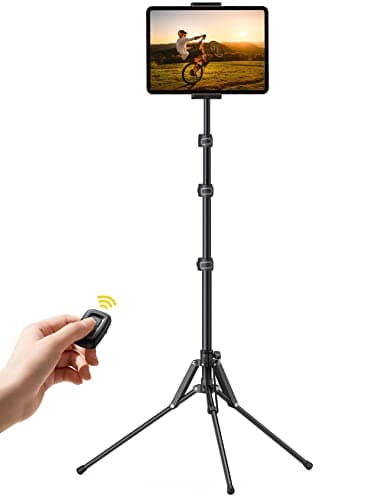 Lamicall Tablet Floor Tripod Stand (FT02) The cheapest way to get a tablet to eye level in front of the bars, and the only pick here that folds into a bag afterwards. | Best tablet stand for Zwift overall | 8.58.5 out of 10 | |
| 2 | 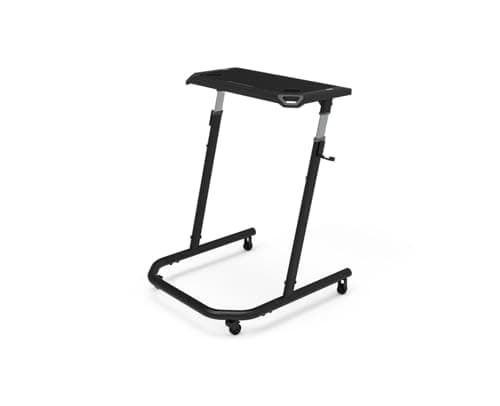 Wahoo Kickr Desk V2 The right answer if the tablet is one of five things you want within reach — and the wrong one if you only ever need to hold a screen. | Best if you want a surface, not just a holder | 8.18.1 out of 10 | $229.99 · View on Amazon #ad We may earn a commission · Price as of October 22, 2026 |
| 3 | 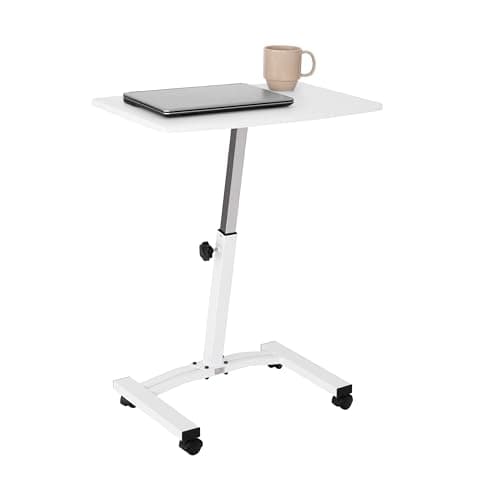 Seville Classics AirLift Mobile Laptop Stand The middle option: a real surface for a tablet and a bottle, small enough to vanish afterwards, at a fraction of the desk price. | Best small-footprint stand with a surface | 7.97.9 out of 10 | $59.99 · View on Amazon #ad We may earn a commission · Price as of October 22, 2026 |
| 4 | 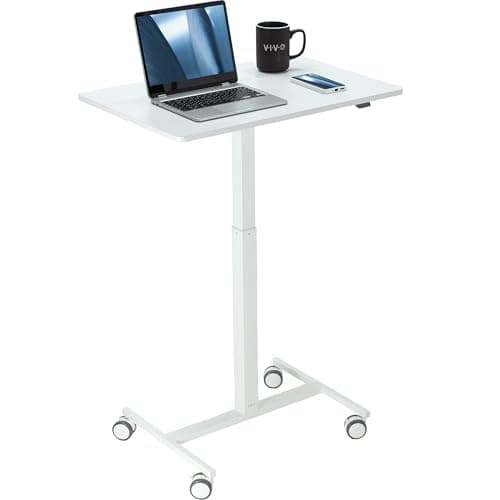 VIVO Mobile 28 inch Standing Laptop Cart The honest workaround: a well-built rolling desk that does the job for less than a branded trainer desk, if you can live with placing it beside the bike. | Best built, if you have the floor space | 8.28.2 out of 10 | $89.99 · View on Amazon #ad We may earn a commission · Price as of October 22, 2026 |
| 5 | 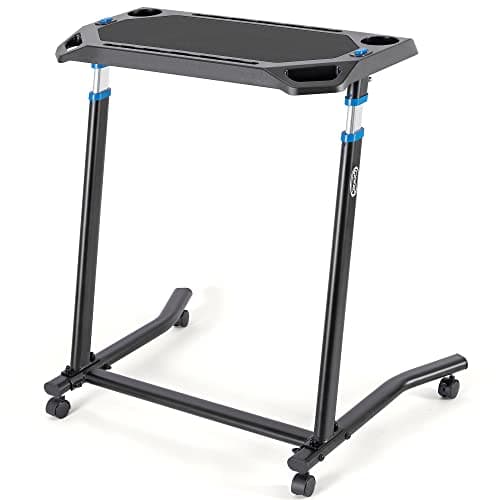 CXWXC Indoor Cycling Desk The budget desk: it turns a tablet-on-a-chair setup into something that looks deliberate, without the flagship price. | Cheapest desk-style option | 7.97.9 out of 10 |
This page is deliberately separate from our trainer desk roundup, because they answer different questions. A desk is about surface: somewhere to put the things you reach for mid-ride. A tablet stand is about position: getting one screen to the right height and angle, and nothing else. If you know which problem you have, the ranking below sorts itself out.
Height is the whole point
The default Zwift tablet setup — on a chair, a stool or a cardboard box — puts the screen somewhere between knee and hip height. You then spend an hour looking down, which is a worse neck position than anything you would tolerate at a desk, and you cannot read the numbers when you are out of the saddle.
Bar height is the target. A screen roughly level with your hoods means you glance rather than crane, and it stays readable when you stand. Every pick on this page can reach that; they differ in what else they do and how much floor they take.
Angle matters almost as much on a tablet, because a glossy screen aimed at a ceiling light is unreadable regardless of height. Only the tripod here tilts — the desks are flat surfaces, which is one reason some riders prop a tablet against a bottle on them.
| Pick | Height | Holds a tablet how? | Packs away? |
|---|---|---|---|
| Lamicall floor tripod | 16.7 - 65 in | Clamp, rotates and tilts | Yes — folds to 24 in |
| Wahoo Kickr Desk V2 | 35 - 47 in | Flat rubber surface | No — rolls aside |
| Seville Classics AirLift | Adjustable | Small flat top | Rolls into a corner |
| VIVO 28 in laptop cart | Adjustable | 28 in flat laminate top | No — largest footprint |
| CXWXC cycling desk | Adjustable | Non-slip flat top | No — steel frame |
What to look for
The height range, against your bars. Measure from the floor to your hoods before you buy. A desk that tops out below that number will always feel low, and a stand that only starts at waist height is no use on a low-stack bike.
Where the feet go.This is the detail that catches people out. A tripod's legs and a desk's base both want the floor directly in front of your front wheel, which is also where a riser block goes and where a mat ends. Plan the floor as a whole.
Stability under a sprint. A trainer that moves — or a rider who gets out of the saddle — will move a light stand. Wide feet, locking casters and a low center of mass all help. A 13-inch tablet at the top of a thin pole is the worst case.
Whether it has to disappear. In a dedicated garage pain cave, nothing needs to fold. In a living room, the fact that the tripod goes into a bag is worth more than any specification on this page.
Everything else you reach for. Be honest: bottles, a phone, a towel, a fan remote and a heart rate strap all need somewhere to live. If they currently live on the floor, you want a desk, not a stand.
The cheap fixes worth knowing
If you are not ready to buy anything, two things help immediately. Raise whatever you are using now — a box on a chair gets you most of the way, and costs nothing. And turn the tablet to landscape and move it slightly to one side of center, so your head is not directly over it when you are on the drops.
A tablet also is not the only screen option. If the room allows a fixed screen, a wall-mounted TV solves height permanently and never needs charging — our best TV for Zwift page covers that route, and Zwift on Apple TV covers the device that usually goes with it. If the tablet itself is the weak link, best tablet for Zwift is the page you want first.
One warning about clamps
Clamp-style holders that attach to your handlebars exist, and we do not recommend them for trainer use. A tablet on the bars moves with every rocking motion, blocks your view of the front of the bike, and puts a screen directly above your front wheel where a dropped bottle can hit it. A floor stand is more stable and costs less.
Still choosing the screen?
See which tablet to run Zwift onThe full reviews
Every pick, in detail
#1 · Best tablet stand for Zwift overall
Lamicall Tablet Floor Tripod Stand (FT02)
8.58.5 out of 10The cheapest way to get a tablet to eye level in front of the bars, and the only pick here that folds into a bag afterwards.
- Height
- 16.7 to 65 in (42.5 to 165 cm), four levels
- Fits
- 4 to 13 in devices (manufacturer)
- Material
- Aluminum tripod and pole
- Weight
- 0.75 kg (about 1.65 lb)
- Adjustment
- 360-degree rotation, tilt
- Folded
- 24 in (61 cm), storage bag included
What we'd praise
- Puts the tablet at hoods height in front of the bars instead of on a stool at knee height
- The height range covers everything from a seated spin to a bar-height race position
- Fits every tablet worth running Zwift on, from an 8.3-inch mini to a 13-inch iPad Air
- Folds to two feet with a bag, so it leaves the room with the bike in an apartment
- Cheap enough to buy alongside the tablet rather than instead of a case
What we'd flag
- At 1.65 lb it is a light tripod, and a hard sprint that rocks the trainer can rock a top-heavy 13-inch tablet
- A tripod's feet sit exactly where a front-wheel riser block wants to go — plan the floor
- It is a stand, not a desk: no bottle, no towel, no phone shelf
- Load capacity is a manufacturer claim; we have not measured it
Most people running Zwift on a tablet start by propping it on a chair, a box or an ironing board, and the thing they are actually missing is height. A floor tripod solves exactly that: the pole adjusts from 16.7 in up to 65 in, which covers everything from a seated spin to a position where the screen sits level with the bars.
The clamp takes 4 to 13 in devices by Lamicall's own figures, so every tablet on our best tablet for Zwift list fits, and the head rotates and tilts so you can square the screen to your eyeline rather than to the room.
The honest limitation is mass. This is a 1.65 lb aluminum tripod, and a big tablet high on a thin pole is top-heavy. On a trainer with movement — or during a sprint that rocks the frame — it moves. Set the pole no higher than you need, spread the feet wide, and keep them clear of where a riser block goes.
#2 · Best if you want a surface, not just a holder
Wahoo Kickr Desk V2
8.18.1 out of 10#ad We may earn a commission · Price as of October 22, 2026
The right answer if the tablet is one of five things you want within reach — and the wrong one if you only ever need to hold a screen.
- Type
- Purpose-built trainer desk
- Height
- 35 to 47 in, tool-free adjustment
- Desktop
- 28 x 14 in
- Surface
- Flat, slip-resistant rubber (Wahoo publishes no tilt)
- Mobility
- Two casters plus two fixed wheels
- Placement
- Rolls over the front wheel
What we'd praise
- Holds the tablet and everything else: bottles, phone, towel, remote, snacks
- The 35 to 47 in height range puts a tablet at bar height on any bike
- Slip-resistant rubber surface means the tablet stays where you put it without a clamp
- Base is shaped to roll over the front wheel, which no generic stand does
- Works with any trainer or smart bike — nothing to check compatibility-wise
What we'd flag
- Several times the price of a tablet stand, because it is a different product
- Wahoo publishes no weight capacity and no product weight, which we record rather than estimate
- No tilt adjustment at all — the surface is flat
- Bulky to store if your pain cave packs away between sessions
A desk and a stand solve overlapping problems. A stand holds a screen; a desk holds a screen, two bottles, a towel, a phone and a fan remote. If your current setup is a tablet on a chair and a bottle on the floor and a towel over the bars, the desk is the purchase that fixes all three.
The specifications that matter here are the height range and the base. 35 to 47 in covers bar height on essentially any bike, and the base is shaped to roll over a front wheel, which is the single thing a generic laptop cart gets wrong.
Two honest notes. Wahoo publishes no weight capacity and no product weight for this desk, and the surface is flat with no tilt — so a tablet lies down rather than standing up, which some riders dislike. Our Kickr Desk V2 review has the full dimension list.
#3 · Best small-footprint stand with a surface
Seville Classics AirLift Mobile Laptop Stand
7.97.9 out of 10#ad We may earn a commission · Price as of October 22, 2026
The middle option: a real surface for a tablet and a bottle, small enough to vanish afterwards, at a fraction of the desk price.
- Type
- Compact rolling stand
- Height
- Adjustable
- Surface
- Small laptop-sized top
- Mobility
- Casters
- Placement
- Tucks beside the bike
- Storage
- Rolls into a corner
What we'd praise
- The smallest footprint of the surface-based picks — it disappears into a corner between rides
- Cheapest way to get both a tablet and a bottle up to bar height
- Rolls, so you can move it mid-ride without unclipping
- A proper flat surface rather than a clamp, so any tablet fits regardless of size
What we'd flag
- Small top holds a tablet and little else — no room for tools, towels and bottles together
- Light construction means it can be knocked over more easily than a wide-base desk
- No lip, so a tablet can slide on a hard effort if the surface is smooth
- Base is not shaped to clear a front wheel
If the tripod sounds too flimsy and the Wahoo desk sounds too expensive, this is the product in between. It is a rolling laptop stand with an adjustable column and a top big enough for a tablet and a bottle, and it costs far less than a purpose-built trainer desk.
The compromise is size in both directions: the top is small enough that a tablet fills it, and the base is narrow enough that it is easier to knock than a wide desk. It also is not shaped to clear a front wheel, so it goes beside the bike rather than over the wheel.
For a setup that has to be cleared away — a living room, a shared spare room — the fact that it rolls into a corner matters more than the specification does. See apartment indoor cycling setups for the rest of that problem.
#4 · Best built, if you have the floor space
VIVO Mobile 28 inch Standing Laptop Cart
8.28.2 out of 10#ad We may earn a commission · Price as of October 22, 2026
The honest workaround: a well-built rolling desk that does the job for less than a branded trainer desk, if you can live with placing it beside the bike.
- Type
- Rolling laptop workstation
- Height
- Adjustable
- Surface
- Flat laminate top, 28 in wide
- Mobility
- Locking casters
- Placement
- Beside or in front of the bars
- Secondary use
- Full standing desk
What we'd praise
- Locking casters mean it stays exactly where you put it during a hard effort
- 28 in of width takes a tablet, a laptop, bottles and a phone at once
- Better built than most purpose-made trainer desks at the same money
- Genuinely useful as a standing desk away from the trainer, so it is never wasted furniture
What we'd flag
- Base is not shaped to clear a front wheel, so placement takes more thought
- No lip on the top edge — a bottle can walk off it
- The largest footprint here; a small room will notice it
- Overkill if all you need is something to hold an iPad
Locking casters are the feature here. A rolling stand that does not lock will creep during a hard effort, and the difference between a desk that stays put and one that drifts is the difference between glancing at the screen and chasing it.
You also get 28 in of flat top, which is enough for a tablet and everything else you would otherwise put on the floor, and a product that doubles as a standing desk when the bike is not on the trainer.
The compromise is shape. The base is a conventional office-furniture base, not one designed to roll over a front wheel, so it goes beside the bars rather than over the wheel. Our trainer desk roundup ranks this category properly if the surface is what you actually want.
#5 · Cheapest desk-style option
CXWXC Indoor Cycling Desk
7.97.9 out of 10The budget desk: it turns a tablet-on-a-chair setup into something that looks deliberate, without the flagship price.
- Type
- Indoor cycling desk
- Height
- Adjustable
- Surface
- Non-slip top
- Mobility
- Casters
- Placement
- Rolls to the bars
- Build
- Steel frame
What we'd praise
- The cheapest way to get a tablet, a phone and two bottles to bar height at once
- Non-slip top holds a tablet without a clamp
- Rolls to the bars and adjusts for height, so it works with any trainer and any bike
- A fraction of the price of the branded trainer desks and does most of the same job
What we'd flag
- Not as stable under a hard sprint as the premium desks
- Another large object in a room that is already filling up with bike
- Steel frame means it is heavier to move than it looks
Almost every indoor setup starts with the screen balanced on something that was never meant to hold it. This is the cheapest product that genuinely fixes that: an adjustable steel-framed desk on casters with a non-slip top, at a price close to a good tablet stand.
You are buying surface rather than precision. There is no clamp, no tilt mechanism and no wheel-clearing base shape — just a flat top at the right height, which is most of what the job requires.
Under a hard out-of-the-saddle effort it is less planted than the Wahoo or the VIVO, so if you sprint regularly, spend the extra. If you do steady endurance work while watching a film, this is plenty.
Good questions
Frequently asked questions
What is the best tablet stand for Zwift?
The Lamicall Tablet Floor Tripod Stand. It adjusts from 16.7 in to 65 in across four levels, clamps devices from 4 to 13 in, rotates 360 degrees and tilts, and folds to 24 in with a storage bag. That combination of height range and packability is what a Zwift setup needs from a stand.
How high should the screen be for Zwift?
Roughly level with your handlebar hoods. That lets you glance at the numbers rather than look down, and keeps the screen readable when you stand up. Measure from the floor to your hoods before buying, and check that number against the stand's height range.
Should I buy a tablet stand or a trainer desk for Zwift?
A stand if you only need to hold the screen and the setup has to pack away. A desk if bottles, a phone, a towel and a fan remote currently live on the floor. The Wahoo Kickr Desk V2 gives you a 28 x 14 in surface at 35 to 47 in with a base shaped to roll over the front wheel, which no generic stand does.
Can I mount a tablet on my handlebars for Zwift?
You can, but it is the worst of the options. A bar-mounted tablet moves with every rocking motion, blocks your view of the front of the bike, and sits where a dropped bottle can hit it. A floor stand is more stable, easier to read and usually cheaper.
Will a tablet stand be stable enough for sprinting?
A light tripod is the least stable option here, especially with a 13-inch tablet at full height. Spread the feet wide, set the pole no higher than you need, and expect some movement on a trainer that rocks. If you sprint regularly, a wide-based desk with locking casters is the safer choice.
Does a tablet stand get in the way of a riser block?
It can. A tripod's legs and a desk's base both want the floor immediately in front of the bike, which is exactly where a front-wheel riser block sits on a wheel-on setup. Plan the floor as one layout - mat, riser block and stand - rather than buying them separately and hoping.
How we sourced this
Keep going