Start Here
Zwift Cog vs Cassette
One is a single sprocket and software gears; the other is the drivetrain you already own. The decision is not about shift feel - it is about whether you want your trainer to care what bike you ride.
For a decade, setting up a direct-drive trainer meant answering a compatibility quiz: how many speeds, which freehub, which lockring, which ratio, and do you own the tools. Virtual shifting deletes the quiz. Instead of a cassette, the trainer carries a single sprocket — the Zwift Cog — and your gear changes happen in software, triggered by a Zwift Click or a Play controller rather than by your derailleur. The chain never moves sideways.
What each setup actually removes
The Cog removes four separate problems. The speed count question, because one sprocket works with an 8-speed chain and a 12-speed chain alike. The freehub standard question, including the XDR trap that catches SRAM owners. The tools, because there is no lockring to torque. And the chain crossover noise, which indoors is a permanent condition rather than an occasional one: your chain line never changes, so if you sit in a cross-chained gear you hear it for the whole session.
A cassette removes one problem: dependence. Mechanical gears work in Zwift, in every other training app, in a plain free-ride session and with no app running at all. They are not a feature that can be deprecated.
What you give up with virtual shifting
App support is a condition, not a given.Virtual shifting works properly in apps that implement it. If your routine includes a second platform, check it supports your trainer's virtual shifting before you remove the cassette — our Zwift vs TrainerRoad and Zwift vs Rouvy comparisons are the right place to start on platform differences.
The shift is an approximation. A mechanical shift is a mechanical event: you feel the chain move. A virtual shift is a resistance change. Most riders stop noticing within a week; some never stop noticing. That is a preference, not a defect.
It needs a controller. A Cog on its own gives you one gear. The Click or Play controller is what makes it a drivetrain, which is why the versions that include both are the ones worth buying.
Your trainer has to support it. This is the compatibility question that replaces the old one, and it is much simpler: either your trainer implements virtual shifting or it does not. Fitting a Cog to a trainer that does not support it leaves you with a single-speed.
How much does gearing matter indoors anyway?
Less than outdoors, which is part of why the Cog works at all. Indoors there is no momentum to carry over a rise and no descent to recover on, so the bailout gear that saves you on a real climb is far less useful. And in ERG mode the trainer holds your target power regardless of gear, so your gear selection barely matters at all — it changes the feel of the pedal stroke, not the workload.
Where gearing does still matter is sprinting and high-torque work in SIM mode, where you want a gear tall enough to put real force through the pedals, and in the low-cadence big-gear work some training plans prescribe. Both are satisfied by a Cog setup with enough virtual range.
| Zwift Cog + virtual shifting | Conventional cassette | |
|---|---|---|
| Speed count must match your bike | No | Yes |
| Freehub standard must match | No | Yes (HG, XDR, Micro Spline) |
| Tools required to fit | None | Lockring tool, plus a chain whip to remove |
| Chain crossover noise | None — chain stays on one cog | Present, and constant indoors |
| Works with any app | Only apps that support virtual shifting | Yes, and with no app at all |
| Shift feel | Software resistance change | Mechanical |
| Moving the trainer between bikes | Trivial, any drivetrain | Needs a matching cassette per drivetrain |
| Extra hardware needed | Click or Play controller | Cassette, and possibly tools |
Which trainers can do it
Virtual shifting is a trainer feature, not a bike feature. Several current units implement it, and some are sold in a bundled version with the Cog and Click in the box — which is the cheapest route to the whole setup, because the standalone kit rarely discounts. Zwift Insider's 2025 Black Friday coverage recorded no deal on the standalone Cog and Click kit at all, which is worth knowing if you were waiting for one; our Black Friday indoor cycling deals page tracks what actually discounts in this category.
If you are still choosing the trainer itself, the best trainer for Zwift and best budget smart trainers both flag which models support the Cog, and thru-axle compatibility covers the other fitment question that still applies either way.
The short answer
What to buy for either route
| # | Product | Best for | Score | Price |
|---|---|---|---|---|
| 1 | 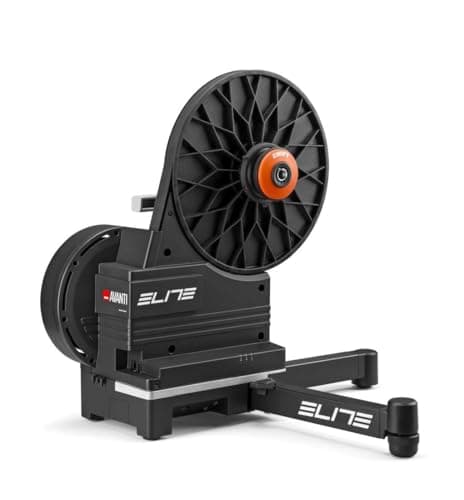 Elite Avanti Zwift Ready (Cog and Click included) The cleanest way to skip the cassette question entirely: the Cog and Click arrive with the trainer. | Best if you want virtual shifting out of the box | 8.98.9 out of 10 | $769.99 · View on Amazon #ad We may earn a commission · Price as of October 22, 2026 |
| 2 | 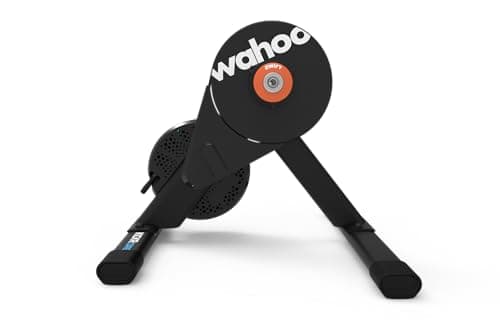 Wahoo Kickr Core 2 The trainer that lets you choose: cassette version if your drivetrain is settled, Cog version if it is not. | Best trainer sold in both cassette and Cog versions | 8.88.8 out of 10 | $549.99 · View on Amazon #ad We may earn a commission · Price as of October 22, 2026 |
| 3 | 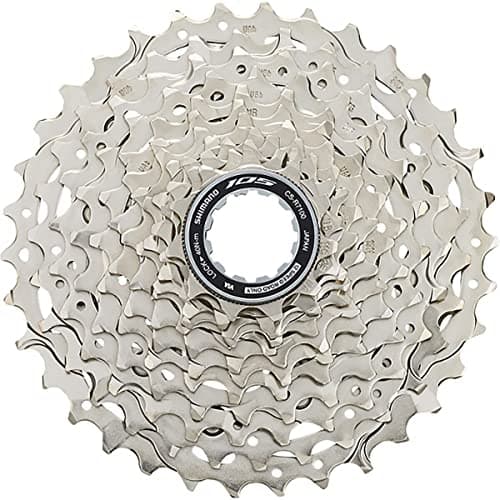 Shimano 105 CS-R7101 The conventional answer, and still the right one if your drivetrain is settled and you want shifting that works everywhere. | Best cassette if you keep real gears | 8.08.0 out of 10 | $80.00 · View on Amazon #ad We may earn a commission · Price as of October 22, 2026 |
| 4 | 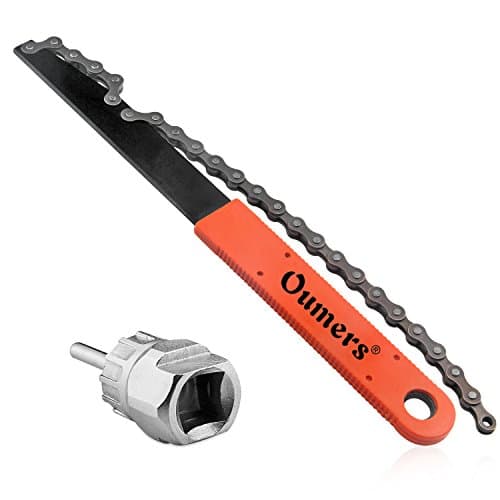 Oumers Cassette Removal Tool Kit The hidden cost of the cassette route: cheap, useful beyond the trainer, and completely unnecessary with a Cog. | Needed only if you go the cassette route | 7.87.8 out of 10 | $12.99 · View on Amazon #ad We may earn a commission · Price as of October 22, 2026 |
So which one?
Buy the Cog version if you own more than one bike, if your next bike might be a different speed count, if you are coming from SRAM and the XDR freehub question has already cost you money once, or if removing a maintenance task from your life is worth more to you than mechanical shift feel.
Buy the cassette if your bike and groupset are settled, if you train in more than one app and are not willing to verify virtual shifting support in each, or if you simply want the trainer to behave exactly like the road.
Do not buy a standalone Cog kit for a trainer that does not support virtual shifting. That is the one genuinely wasted purchase available here, and it is an easy mistake to make because the Cog is sold separately.
Going the cassette route?
See the cassette compatibility rulesThe full reviews
Every pick, in detail
Best if you want virtual shifting out of the box
Elite Avanti Zwift Ready (Cog and Click included)
8.98.9 out of 10#ad We may earn a commission · Price as of October 22, 2026
The cleanest way to skip the cassette question entirely: the Cog and Click arrive with the trainer.
- Hardware
- Identical Avanti trainer
- In the box
- Zwift Cog and Zwift Click, per the listing
- Shifting
- Virtual, in Zwift — no derailleur movement
- Cassette
- Not needed if you run the Cog
- Accuracy
- ±1% (optical torque sensor)
- Max gradient
- 18%
What we'd praise
- The Cog and the Click are in the box, so there is no separate kit to source and no cassette to buy at all
- Your drivetrain becomes irrelevant: 8-speed or 12-speed, Shimano or SRAM, the trainer stops caring
- No lockring tool, no freehub standard to check, no ratio to match
- ±1% optical torque sensor and an 18% gradient ceiling on the same hardware as the standard Avanti
What we'd flag
- You are paying a premium over the standard Avanti for parts you may not want
- Virtual shifting works properly only in apps that support it
- If you later want a conventional cassette on this trainer, that is a second purchase
If you have decided the Cog is the answer, buying a trainer that includes it is cheaper and simpler than assembling the same thing from parts. Elite lists the Zwift Cog and Zwift Click in the box on this version, on identical hardware to the standard Avanti — ±1% from an optical torque sensor, an 18% gradient ceiling — and you never buy a cassette.
The honest caveat is that you pay for the kit whether or not you end up liking virtual shifting. Our Elite Avanti review covers both versions, and Avanti vs Kickr Core 2 is the cross-shop.
Best trainer sold in both cassette and Cog versions
Wahoo Kickr Core 2
8.88.8 out of 10#ad We may earn a commission · Price as of October 22, 2026
The trainer that lets you choose: cassette version if your drivetrain is settled, Cog version if it is not.
- Type
- Direct drive, electromagnetic
- Claimed accuracy
- ±2%
- Max resistance
- 1,800 W
- Max gradient
- 16%
- Flywheel
- 5.4 kg
- Connectivity
- WiFi, Bluetooth, ANT+ FE-C
What we'd praise
- Sold both with a cassette pre-installed and in a Zwift Cog version, so the decision is yours at the checkout rather than afterwards
- Onboard WiFi, Bluetooth and ANT+ FE-C, so it pairs to any Zwift platform
- 1,800 W and 16% is more ceiling than most riders will ever use
- The most widely reviewed trainer at this price, which makes the specification sheet trustworthy
What we'd flag
- ±2% is a wider claim than the Avanti's ±1%
- You have to know which version you are buying — the cassette is not always included
- Virtual shifting is a Cog-version feature, not something you add to a cassette build later for free
The Core 2 is the useful product for this page because Wahoo sells it both ways. If your bike is 11-speed and staying that way, buy the cassette version and never think about the Cog. If your drivetrain might change, or you share the trainer between bikes with different speed counts, the Cog version removes the problem permanently.
Specification-wise it is ±2%, 1,800 W, 16% and a 5.4 kg flywheel, with WiFi, Bluetooth and ANT+ FE-C. Our Kickr Core 2 review is the full write-up — and the one thing to check before ordering is which version is in the box.
Best cassette if you keep real gears
Shimano 105 CS-R7101
8.08.0 out of 10#ad We may earn a commission · Price as of October 22, 2026
The conventional answer, and still the right one if your drivetrain is settled and you want shifting that works everywhere.
- Speeds
- 12
- Group level
- 105
- Ratio
- 11-34T as listed
- Freehub
- Shimano HG, 12-speed road
- Compatible with
- Shimano 12-speed road drivetrains
- Finish
- Silver
What we'd praise
- Mechanical shifting your hands already know, with no app dependency whatsoever
- Works in every app, every game and offline, because nothing in software is involved
- 105 durability at a sensible price for a cassette that lives indoors
- An 11-34T ratio gives a usable spread even though gradient is simulated
What we'd flag
- Has to match your speed count and your freehub standard — the whole problem the Cog removes
- Needs a lockring tool to fit, and a chain whip to remove the old one
- Chain crossover noise on the extreme sprockets, all ride, because the chain line never changes indoors
- A second cassette if your next bike is a different speed count
Nothing has gone wrong with cassettes. A matched 12-speed 105 cassette on the trainer gives you the shifting you already have on the road, in every app, with no software layer that can stop supporting it. If your bike is 12-speed Shimano and likely to stay that way, this is the uncomplicated purchase.
The costs are the ones the Cog exists to remove: you must match speed count and freehub standard, you need a lockring tool, and you live with chain crossover noise because your chain line never varies indoors. Best cassettes for smart trainers walks the compatibility rules properly.
Needed only if you go the cassette route
Oumers Cassette Removal Tool Kit
7.87.8 out of 10#ad We may earn a commission · Price as of October 22, 2026
The hidden cost of the cassette route: cheap, useful beyond the trainer, and completely unnecessary with a Cog.
- Includes
- Chain whip and lockring tool
- Pattern
- Shimano HG lockrings
- Also needs
- Adjustable wrench or large socket
- Used for
- Fitting and removing cassettes
- Frequency
- Once at setup, then rarely
- Alternative
- A shop fitting, for roughly the same money
What we'd praise
- The two tools a cassette install actually requires, for very little money
- Also services your road wheel, so it is not a single-use purchase
- Makes a 15-minute job out of something that otherwise needs a shop visit
- Zero of this is needed on a Cog setup, which is rather the point of this page
What we'd flag
- You still need an adjustable wrench or a large socket to turn the lockring tool
- Shimano HG pattern, so check it against your lockring
- A shop will fit a cassette for roughly what the kit costs
Worth listing because it is the part of the cassette route people forget to budget for. A lockring tool fits a new cassette; a chain whip is only needed to remove an old one. Both are inexpensive and both service your road wheels too.
On a Cog setup you need none of it, which is a genuine part of the comparison rather than a footnote. How to set up a smart trainer covers the install either way.
Good questions
Frequently asked questions
Is a Zwift Cog better than a cassette?
For many riders, yes. A single cog with virtual shifting removes the speed-count question, the freehub standard question, the tools and the chain crossover noise entirely, and it makes the trainer indifferent to which bike you mount. The trade-offs are that it works properly only in apps that support virtual shifting, and that the shift is a software resistance change rather than a mechanical event.
Do I need a cassette if I use a Zwift Cog?
No. That is the point of the Cog: a single sprocket replaces the cassette on a supported trainer, so there is nothing to match to your drivetrain and no lockring tool required. You do need a Zwift Click or Play controller to change gears, otherwise you have one gear.
Does the Zwift Cog work with any trainer?
No. Virtual shifting has to be implemented by the trainer, so a Cog on an unsupported unit leaves you with a single-speed. Several current trainers support it and some are sold in versions with the Cog and Click included, which is the cheapest way to get the full setup.
Does the Zwift Cog work with 11-speed and 12-speed chains?
Yes, which is the main attraction. Because the chain sits on one sprocket rather than moving across a cassette, the speed count of your drivetrain stops mattering, and the same trainer can take bikes with different speed counts without buying a second cassette.
Does gearing matter on a smart trainer?
Less than outdoors. There is no momentum to carry over a rise and no descent to recover on, so an easier bailout gear is far less valuable. In ERG mode the trainer holds your target power regardless of gear, so gear choice changes the feel of the stroke rather than the workload. Gearing still matters for sprints and big-gear low-cadence work in SIM mode.
Can I switch back from a Zwift Cog to a cassette?
Yes on a trainer with a standard freehub - you fit a matching cassette with a lockring tool as normal. It is a second purchase, though: a cassette that matches your speed count and freehub standard, plus the tools if you do not own them. If you are unsure which route suits you, buying a trainer sold in both versions keeps the decision at the checkout.
How we sourced this
- Zwift support: Zwift Cog, Click and virtual shifting
- Zwift — platform and supported hardware (official)
- Shimano product information portal for cassette specifications
- Wahoo — trainer freehub and cassette compatibility (manufacturer)
- Elite — Avanti smart trainer specifications (manufacturer)
- SRAM — road drivetrain and cassette range (manufacturer)
Keep going