Indoor Setup
Zwift Setup on a Budget: What to Buy, in What Order
The cheapest Zwift build that still works properly — the one line not to cross, the parts you can skip entirely, and the order to buy them in when the money arrives in installments.
The short answer
Quick picks
| # | Product | Best for | Score | Price |
|---|---|---|---|---|
| 1 | 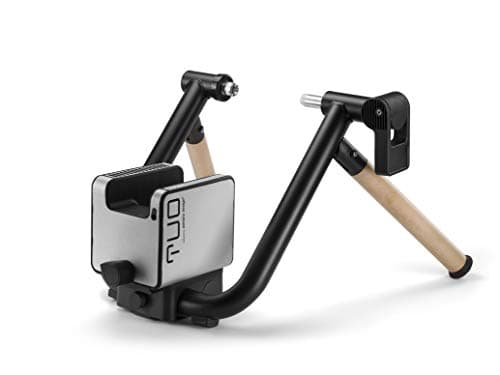 Elite Tuo The budget line worth defending: controllable resistance and measured power, without direct-drive money. | The trainer | 7.67.6 out of 10 | $149.99 · View on Amazon #ad We may earn a commission · Price as of October 21, 2026 |
| 2 | 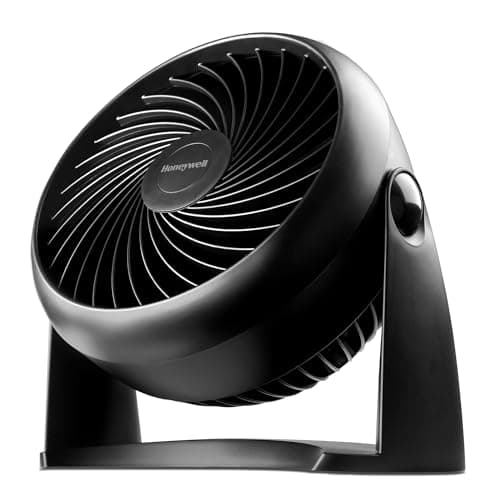 Honeywell HT-900 TurboForce The single highest-return purchase in a budget pain cave: real airflow for the price of a set of bar tape. | The fan | 8.28.2 out of 10 | $18.79 · View on Amazon #ad We may earn a commission · Price as of October 21, 2026 |
| 3 | 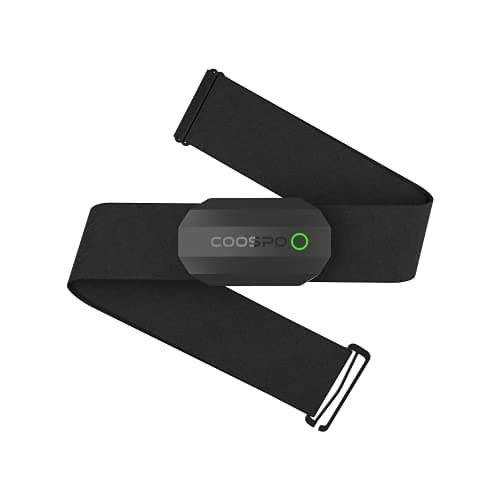 COOSPO H808S Heart Rate Monitor The cheapest sensor that meaningfully improves your training: a dual-protocol chest strap for pocket money. | The heart rate strap | 8.48.4 out of 10 | $29.99 · View on Amazon #ad We may earn a commission · Price as of October 21, 2026 |
| 4 | 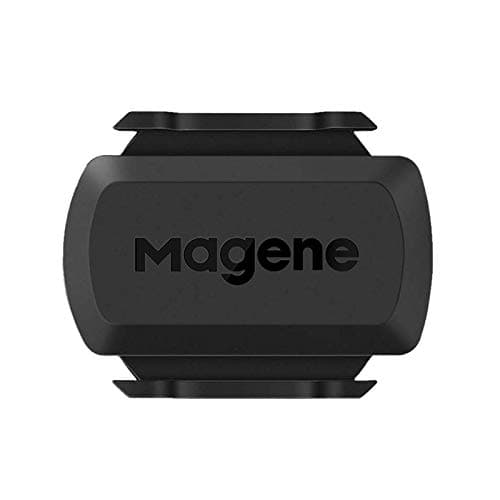 Magene S3+ Speed and Cadence Sensor Cheap insurance for cadence data on any bike, and the sensor that makes a non-smart trainer usable in Zwift. | The cadence sensor | 8.68.6 out of 10 | $16.99 · View on Amazon #ad We may earn a commission · Price as of October 21, 2026 |
| 5 | 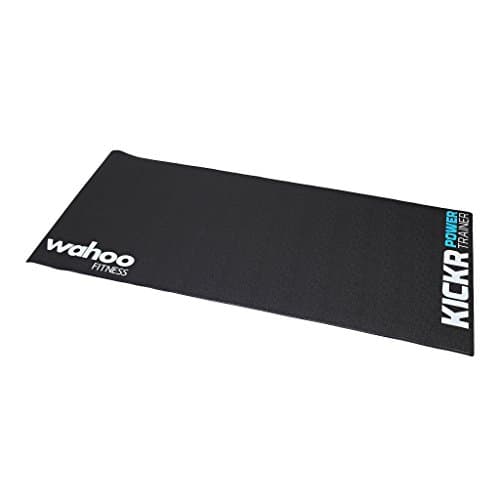 Wahoo Kickr Trainer Floormat The unglamorous purchase that protects your floor and your deposit — and stops the trainer walking away from you. | The mat | 8.38.3 out of 10 |
Zwift itself is the cheap part. What people underestimate is everything around it: a trainer the app can talk to, a screen you can see, a sensor or two, and enough moving air to survive an hour. This guide is a complete budget build in priority order, so that if the money arrives in installments you buy the right thing first. If you want the no-compromise version instead, our best indoor cycling setup guide is the full-fat build, and the Zwift setup guide covers getting it all talking.
The priority order
1. A controllable trainer.This is the purchase everything else supports. Look for the words FE-C or FTMS in the specification — that is what "Zwift can control it" looks like on a spec sheet.
2. A fan. Not optional, not a luxury, and the single highest-return item per dollar in indoor cycling. Heat is what ends sessions early and makes indoor riding feel harder than the same effort outdoors.
3. A screen you already own. Zwift runs on phones, tablets, laptops and TVs. Start with what is in the house. A tablet propped on a stool is a perfectly good Zwift display, and buying a dedicated screen before you have ridden twenty times is premature. If the house has no tablet that runs it, the Zwift tablet roundupcovers the cheapest ones that clear Zwift's published requirements.
4. A heart rate strap. Cheap, and it makes every workout more informative, particularly on a budget trainer where your power number is more approximate than you would like.
5. A mat, and cadence if your trainer does not report it. Protective and useful rather than transformative — buy them when the first four are handled.
| Part | What it does | Skippable? | What skipping costs you |
|---|---|---|---|
| Controllable trainer | Resistance control and measured power | No | Zwift becomes a video with a knob |
| Fan | Keeps core temperature down | No | Shorter, more miserable sessions |
| Screen | Runs Zwift | Use what you own | Nothing, if you own a phone or tablet |
| Heart rate strap | Effort and recovery data | Yes, briefly | Less useful zones and pacing |
| Trainer mat | Sweat, vibration, floor protection | Yes, briefly | Floor damage and noise downstairs |
| Cadence sensor | Pedaling rate | If trainer reports it | Missing a metric most plans prescribe |
| Front wheel riser | Levels the bike on wheel-on setups | Often | Slightly nose-down position |
Where to spend, where to save
Spendon the trainer's control capability and on airflow. Those two determine whether the setup is a training tool and whether you will use it. Neither is recoverable later without buying again.
Save on the screen, the desk, the smart fan and the branded accessories. A borrowed tablet, a kitchen stool and a cheap towel do the same job as their expensive equivalents for the first season. You can always upgrade once you know indoor riding has stuck — and if it has not stuck, you will be glad you did not furnish a room for it.
The parts a budget build genuinely does not need
A smart fan that ramps with your heart rate is a nice thing and does nothing a cheap fan on a dial cannot. A trainer desk is a genuine convenience and a pure luxury at this budget — a stool works. A power meter is redundant if you only ride indoors, since your trainer already measures power; it is only worth buying when you ride outside too, which we cover in smart trainer vs power meter. And a steering accessory is fun and affects nothing about your fitness.
The honest list of things people buy too early is longer than the list of things they buy too late. Ride twenty sessions on the minimum build and let your own annoyances tell you what to upgrade — they will be more accurate than any guide, including this one.
Making a cheap build ride well
Three habits do more for a budget setup than any accessory. Pump your tire to the same pressure every ride and tighten the roller by the same amount — on a wheel-on trainer that consistency is what makes your numbers comparable week to week. Warm up for ten minutes and then run a spindown if your trainer supports one, because a cold trainer reads differently from a warm one. Point the fan at your chest and face, not at your legs, because that is where the cooling actually happens.
Do those three and a budget trainer will give you numbers you can train on for years. Skip them and you will conclude the trainer is inaccurate when what is actually inconsistent is the setup around it. Our accuracy guide covers why repeatability matters more than precision.
Ready to pick a trainer?
See the best budget smart trainers, rankedWhat the whole build costs
We do not quote total prices here, because every component on this page changes price weekly and a number typed into an article ages badly. What we can tell you is the shape: the trainer is the overwhelming majority of the spend, the fan is a small fraction of it, and the sensors and mat together typically cost less than the fan and trainer combined. Live prices for each pick are shown above.
If those numbers still stretch too far, our cost guide breaks down what each trainer tier buys, and do I need a smart trainer is worth reading before you spend anything at all.
The full reviews
Every pick, in detail
#1 · The trainer
Elite Tuo
7.67.6 out of 10#ad We may earn a commission · Price as of October 21, 2026
The budget line worth defending: controllable resistance and measured power, without direct-drive money.
- Type
- Wheel-on, controllable
- Claimed accuracy
- ±2.5%
- Max resistance
- 1,300 W
- Max gradient
- 10%
- Zwift
- Full resistance control
- Connectivity
- BT, ANT+ FE-C
What we'd praise
- The cheapest trainer here that Zwift can actually control — climbs get harder on their own
- Rear wheel stays on, so there is no cassette to buy and no axle adapters to hunt
- Measures power rather than estimating it from wheel speed
What we'd flag
- Accuracy depends on tire pressure and roller tension staying consistent
- Lower ceilings than direct drive, and real tire wear on every ride
If there is one place not to economize in a budget Zwift build, it is here — specifically, on the word controllable. A trainer Zwift can command is a fundamentally different experience from one it cannot. Climbs load up on their own, ERG workouts hold a target, and the number on screen is measured rather than guessed.
The Tuo is the cheapest honest way to have that. It gives up ceilings and a little accuracy discipline to the direct-drive tier, and it wears your tire. It does not give up the thing that makes Zwift work. If you can stretch further, the budget direct-drive tier is the next rung.
#2 · The fan
Honeywell HT-900 TurboForce
8.28.2 out of 10#ad We may earn a commission · Price as of October 21, 2026
The single highest-return purchase in a budget pain cave: real airflow for the price of a set of bar tape.
- Type
- Compact air circulator
- Speeds
- Three
- Head
- 90-degree pivot
- Footprint
- Small — desk or floor
- Mounting
- Wall-mountable
- Control
- Manual dial
What we'd praise
- Moves far more air per dollar than any smart fan and costs a fraction of one
- Pivoting head aims airflow at your chest and face rather than your shins
- Small enough to sit on a shelf or wall-mount out of the way
What we'd flag
- No app control, no speed matching to your effort — you get up and turn the dial
- Noisy at the top setting, which is the setting you will use
New indoor riders under-buy fans and over-buy trainers, and it is the most common way a budget Zwift setup goes wrong. Without airflow your core temperature climbs, your heart rate drifts upward at the same wattage, and a session that should have been an hour becomes forty minutes of misery.
The HT-900 solves that for very little money. It is loud at full speed and it has no clever features, and neither matters — it moves air at your chest, which is the entire job. Buy two if the budget allows and put one at head height. Our fan roundup covers the whole field.
#3 · The heart rate strap
COOSPO H808S Heart Rate Monitor
8.48.4 out of 10#ad We may earn a commission · Price as of October 21, 2026
The cheapest sensor that meaningfully improves your training: a dual-protocol chest strap for pocket money.
- Type
- Chest strap
- Connectivity
- Bluetooth and ANT+
- Water resistance
- IP67
- Battery
- Coin cell, replaceable
- Zwift
- Pairs as a heart rate source
- Strap
- Washable, adjustable
What we'd praise
- Dual Bluetooth and ANT+ at a price where many straps offer only one
- Chest straps read far more reliably than any wrist optical sensor during hard efforts
- Cheap enough that it belongs in every budget build without argument
What we'd flag
- Fewer years of track record than Polar or Garmin at the same job
- Chest straps need wetting before a ride or the first few minutes read erratically
On a budget trainer, heart rate is the honest cross-check on a power number that depends on your tire pressure. It also unlocks the training zones most beginner plans are written around, and it is the metric that tells you whether you are actually recovering between intervals.
The H808S does the job for very little. Chest straps read the electrical signal from your heart rather than inferring it optically from your wrist, which is why they hold up during hard efforts when watch sensors drop out. Wet the contacts before you put it on. More options in our heart rate monitor roundup.
#4 · The cadence sensor
Magene S3+ Speed and Cadence Sensor
8.68.6 out of 10#ad We may earn a commission · Price as of October 21, 2026
Cheap insurance for cadence data on any bike, and the sensor that makes a non-smart trainer usable in Zwift.
- Type
- Speed or cadence, switchable
- Connectivity
- Bluetooth and ANT+
- Mounting
- Magnet-free, strap or crank
- Battery
- Coin cell, replaceable
- Zwift
- Pairs as cadence
- Weight
- Very light
What we'd praise
- One sensor works as either speed or cadence, so a pair covers both roles
- Dual protocol at a price most single-protocol sensors sit at
- Magnet-free mounting means nothing to align and nothing to knock out of place
What we'd flag
- The Tuo already reports cadence, so this matters most if you add a second bike
- Coin cell means an occasional battery hunt
Cadence is the metric budget builds forget. It tells you whether you are grinding a big gear because you are strong or because you are tired, and most structured workouts prescribe it alongside power. Some trainers report it, some do not, and a cheap sensor removes the question.
The S3+ is also the part that rescues a build if you end up on a non-controllable trainer — set to speed mode, it feeds Zwift the wheel speed it needs for virtual power. Our cadence sensor roundup covers the alternatives.
#5 · The mat
Wahoo Kickr Trainer Floormat
8.38.3 out of 10The unglamorous purchase that protects your floor and your deposit — and stops the trainer walking away from you.
- Type
- Trainer floor mat
- Job
- Sweat, vibration and floor protection
- Surface
- Textured, wipe-clean
- Storage
- Rolls up
- Placement
- Under trainer and front wheel
- Use
- Any wheel-on or direct-drive trainer
What we'd praise
- Stops sweat reaching the floor, which is what actually ruins carpet and laminate
- Damps the vibration that travels through a floor to the room below
- Keeps the trainer from creeping across a hard floor during hard efforts
What we'd flag
- Costs more than a generic exercise mat that does most of the same job
- Does nothing about airborne noise — that is what the tire hum is
Sweat is corrosive, and indoor riders produce a remarkable amount of it in a very small area. A mat is the cheapest insurance available against a ruined floor, and on a wheel-on trainer it also catches the fine rubber dust the tire sheds.
It does one more thing worth the money: it damps the structure-borne vibration that travels into a floor and out of a ceiling downstairs. That is what neighbors below actually hear. See the full field in our trainer mat roundup.
Good questions
Frequently asked questions
What is the cheapest setup that works properly with Zwift?
A controllable smart trainer, a fan, and a screen you already own. That combination gives you automatic resistance, measured power and a survivable room. Everything else, including a heart rate strap, mat and cadence sensor, improves the experience but is not required for Zwift to work correctly.
Can I use Zwift with a cheap non-smart trainer?
Yes, with a speed sensor. Zwift calculates virtual power from your wheel speed against the trainer's published resistance curve. The ride works, but resistance never changes on its own, ERG mode is unavailable, and the power figure is an estimate rather than a measurement.
Do I need a smart TV or a dedicated screen for Zwift?
No. Zwift runs on phones, tablets, laptops and streaming devices, so start with whatever you already own. A tablet propped up in front of the bike is a perfectly usable display, and buying a screen before you know indoor riding suits you is the most common early overspend.
Do I need a fan for indoor cycling?
Yes, and it is the highest-return purchase per dollar in the whole build. Without airflow your core temperature rises, your heart rate drifts upward at the same wattage, and sessions end early. A basic three-speed circulator aimed at your chest does the job for very little money.
Do I need a cadence sensor if my trainer reports cadence?
No. If your trainer already broadcasts cadence, a separate sensor is redundant on that bike. A cheap sensor is still worth having if you ride a second bike indoors, or if you might end up on a non-controllable trainer where speed data is needed for virtual power.
Should I buy a power meter for a budget Zwift setup?
Not if you only ride indoors. A controllable smart trainer already measures power, so a power meter adds nothing in that room. It becomes worth buying when you also ride outdoors and want one consistent power source across both, which is a different purchase decision entirely.
How we sourced this
Keep going