Accessory Review
Garmin Cadence Sensor 2 Review
No magnets, no alignment, no compatibility question, and a year on a coin cell. The harder question is whether your setup already reports cadence without it.
The short answer
Quick picks
| # | Product | Best for | Score | Price |
|---|---|---|---|---|
| 1 | 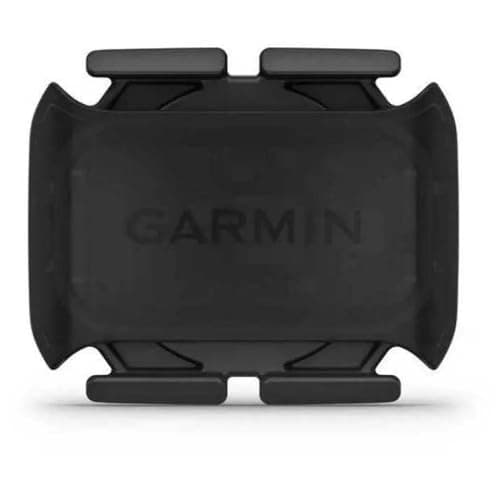 Garmin Cadence Sensor 2 The cadence sensor to buy if you need one: magnet-free, universally compatible, dual-broadcast, and a battery you change once a year. Just check first that you actually need one. | Best cadence sensor | 8.88.8 out of 10 | |
| 2 | 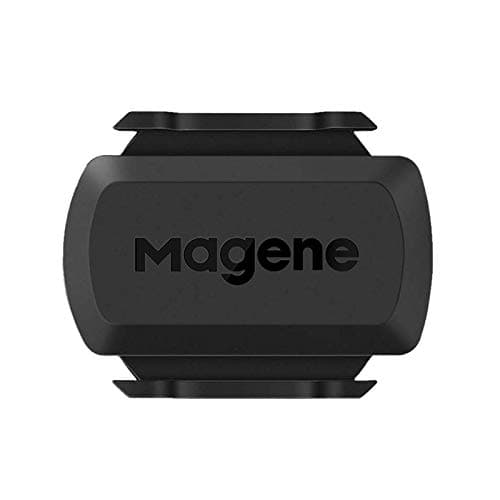 Magene S3+ Speed and Cadence Sensor Does the same job for much less. The right choice if a cadence sensor feels like something you should not be spending much on — which is a defensible position. | Best value alternative | 8.58.5 out of 10 | $16.99 · View on Amazon #ad We may earn a commission · Price as of October 21, 2026 |
Cadence is the most underrated number in indoor cycling. Power tells you how much work you are doing; cadence tells you howyou are doing it, and the difference between grinding 250 W at 65 rpm and spinning it at 95 is the difference between a session that builds you and one that empties your legs. It is also the single most useful thing to watch when ERG mode starts to bite.
The Garmin Cadence Sensor 2 is the default way to get that number onto a screen. It is an accelerometer in a small pod that rubber-bands to your left crank arm, senses rotation directly, and broadcasts over ANT+ and Bluetooth. There is almost nothing wrong with it. The interesting question is whether you need one at all.
Check this before you buy anything
A large share of the people shopping for a cadence sensor already have cadence and do not know it. Work through this list first.
If you have a smart trainer, it almost certainly broadcasts cadence. Direct-drive trainers derive it from the drive unit and transmit it alongside power over FE-C or FTMS. It may simply not be paired in your app — in Zwift, cadence is a separate pairing slot from power, and plenty of riders have never filled it. Check there before spending anything.
If you have a power meter, it definitely reports cadence. Every crank, spider and pedal meter measures cadence as part of calculating power, so a 4iiii Precision, an Assioma or a Quarq makes this sensor redundant.
If you have a wheel-on dumb trainer, an unconnected spin bike, or a bike with neither, this is exactly what the sensor is for. Our cadence sensor for a stationary bike guide covers that scenario in detail, including the ones where a crank-mounted sensor will not fit.
Why magnet-free matters
Older cadence sensors worked by watching a magnet on the crank pass a fixed pickup on the frame. That design produced a specific and universally hated set of problems: the gap had to be right, the magnet worked loose, the pickup rotated on its zip-tie, and the number dropped out on rough road or when someone knocked the bike.
The Cadence Sensor 2 uses an accelerometer to detect the crank arm rotating. There is no magnet, no pickup, and no alignment. It attaches with rubber bands to any crank arm of any length, works out its own orientation, and starts counting. Fitting it takes under a minute, and moving it to a different bike takes the same.
For an indoor setup, that has a practical consequence worth naming: if you keep one bike on the trainer and one for outdoors, this sensor is trivially portable between them. There is no frame-mounted half to leave behind.
| Garmin Cadence Sensor 2 | Magene S3+ | Trainer or power meter | |
|---|---|---|---|
| Cadence source | Crank-arm accelerometer | Crank-arm accelerometer | Derived from the drive unit or crank |
| Magnets | None | None | N/A |
| Battery | CR2032, up to 12 months | CR2032 | Powered by the device |
| ANT+ | Yes | Yes | Usually |
| Bluetooth | Yes | Yes | Usually |
| Extra hardware | Yes — one more thing | Yes | No |
| Water resistance | 1 ATM | Rated for rain | N/A |
| Also gives speed | No | Switchable mode | Trainer reports virtual speed |
| Cost | Mid | Low | Already paid for |
Dual broadcast is the reason to pick Garmin over cheaper options
ANT+ and Bluetooth simultaneously sounds like a footnote and is the specification that decides how well this sensor fits a pain cave.
ANT+ is a broadcast protocol: the sensor shouts, and any number of devices can listen without pairing exclusively. Bluetooth is paired, and paired connections are limited. In a room with a tablet running Zwift, a head unit recording a backup, and possibly a trainer relaying sensors, a single-protocol sensor gets claimed by the first device and disappears from the second. That is a meaningful share of the questions our connection troubleshooting guide answers.
If your laptop or tablet is Bluetooth-only and you want to use the ANT+ side, a cheap ANT+ dongle unlocks it — worth knowing, because the ANT+ path is generally the more robust of the two indoors.
Living with it: the rubber bands are the weak point
The sensor pod will outlast the bike. The rubber mounting bands will not — they perish over a year or two, particularly on a trainer bike, where indoor sweat is far more concentrated and corrosive than anything outdoor riding produces. Spares are cheap and worth having before you need them; our accessories checklist covers the rest of the small-consumables problem, including why a sweat net earns its place.
Battery is a CR2032 rated for up to twelve months, changed with a coin and a quarter turn. The 1 ATM rating means rain and sweat are fine and immersion is not, which is the correct priority for a part that lives beside a drivetrain.
One pairing note: if you also have a power meter or trainer broadcasting cadence, pair only one of them as the cadence source. Two sources reporting slightly different numbers into the same session is a recipe for confusing data, and Zwift will not always pick the one you expected.
Who should buy it
Buy it if cadence is genuinely missing from your setup — a dumb trainer, an unconnected bike, a rollers session where you want the number to keep you honest. It is the most frictionless sensor of its kind and it will work on any bike you own for years.
Buy the cheaper Magene if the price of a Garmin badge for a revolution counter feels disproportionate, which is a reasonable view. Buy nothing at all if you own a smart trainer or a power meter, and instead check your app's pairing screen — the number is very likely already there. Our cadence sensor roundup covers the field, and cadence sensor vs power meter settles the bigger question about which number to spend money on first.
Still deciding?
Compare every cadence sensorThe full reviews
Every pick, in detail
#1 · Best cadence sensor
Garmin Cadence Sensor 2
8.88.8 out of 10The cadence sensor to buy if you need one: magnet-free, universally compatible, dual-broadcast, and a battery you change once a year. Just check first that you actually need one.
- Type
- Crank-arm mounted, accelerometer
- Magnets required
- None
- Battery
- CR2032, up to 12 months
- Connectivity
- ANT+, Bluetooth
- Water resistance
- 1 ATM
- Mounting
- Rubber bands, any crank length
What we'd praise
- No magnets and no alignment — it straps to the crank arm and starts working
- Broadcasts ANT+ and Bluetooth simultaneously, so a head unit and Zwift can both read it
- Up to twelve months from a CR2032 you can replace with a coin and thirty seconds
- Fits any crank length, on any bike, with no compatibility question at all
- Small and light enough that you stop noticing it after the first ride
What we'd flag
- The rubber bands perish eventually and are the part that fails, not the sensor
- Cadence only — no power, no speed, and no torque information
- Redundant if you own a smart trainer or a power meter, both of which already report cadence
- Costs more than several perfectly good third-party sensors that do the same job
The Cadence Sensor 2 is an accelerometer in a small pod that rubber-bands to your left crank arm. It counts revolutions by sensing rotation rather than by watching a magnet pass a pickup, which removes the alignment problem that made older cadence sensors so irritating.
It broadcasts on ANT+ and Bluetooth at once, runs for up to a year on a CR2032, and fits any crank. There is very little to say against it except that you may not need it — see below.
#2 · Best value alternative
Magene S3+ Speed and Cadence Sensor
8.58.5 out of 10#ad We may earn a commission · Price as of October 21, 2026
Does the same job for much less. The right choice if a cadence sensor feels like something you should not be spending much on — which is a defensible position.
- Type
- Switchable speed or cadence
- Magnets required
- None
- Battery
- CR2032
- Connectivity
- ANT+, Bluetooth
- Mounting
- Crank arm or wheel hub
- Price band
- Budget
What we'd praise
- A fraction of the Garmin's price for the same fundamental job
- Switchable between speed and cadence mode, so one sensor covers two roles
- Also dual-broadcast over ANT+ and Bluetooth
- Magnet-free, same as the Garmin
What we'd flag
- App and firmware experience is less polished than Garmin's
- Build quality and mount durability are a step down
- Pairing quirks are more common on some head units
Cadence is a simple measurement and it does not require an expensive sensor. The Magene S3+ counts the same revolutions, broadcasts on the same two protocols, and switches to speed-sensor duty if you would rather.
Our cadence sensor roundup ranks the whole field if you want to compare more closely.
Good questions
Frequently asked questions
Do I need a cadence sensor if I have a smart trainer?
Almost certainly not. Direct-drive smart trainers derive cadence from the drive unit and broadcast it alongside power. If you cannot see it, the usual cause is that cadence has not been paired in your app — in Zwift it is a separate pairing slot from power. Check there before buying anything.
Does the Garmin Cadence Sensor 2 need magnets?
No. It uses an accelerometer to sense the crank arm rotating, so there is no magnet, no frame-mounted pickup and no alignment gap to get right. It attaches with rubber bands to any crank arm of any length and works out its own orientation.
How long does the Garmin Cadence Sensor 2 battery last?
Up to twelve months from a single CR2032 coin cell, replaceable with a coin and a quarter turn of the battery door. The sensor is rated to 1 ATM, which covers rain and sweat but not immersion.
Does the Garmin Cadence Sensor 2 work with Zwift?
Yes. It broadcasts over ANT+ and Bluetooth simultaneously, so Zwift will find it either way, and a head unit can read the ANT+ signal at the same time. If your computer or tablet is Bluetooth-only, a cheap ANT+ dongle gives you the more robust of the two paths indoors.
Will the Garmin Cadence Sensor 2 fit my bike?
Almost certainly. It mounts to the crank arm with rubber bands and does not care about crank length, frame material or drivetrain. The main exception is a spin bike or exercise bike with a shrouded crank, where there may not be enough exposed arm to strap it to.
Garmin Cadence Sensor 2 or a cheaper sensor?
The job is simple and cheaper sensors do it. What Garmin adds is polish: reliable dual ANT+ and Bluetooth broadcast, dependable firmware, and a mount that survives. If a revolution counter feels like something you should not spend much on, the Magene S3+ is a defensible choice at a fraction of the price.
How we sourced this
- Garmin Speed Sensor 2 and Cadence Sensor 2 specifications (owner's manual, manufacturer)
- Garmin Cadence Sensor 2 battery replacement and battery life (manufacturer)
- Garmin sports and fitness product range (manufacturer)
- Zwift support: pairing sensors, cadence and supported devices
- Magene speed and cadence sensor specifications (manufacturer)
Keep going