Pain Cave
The Best Speed Sensors for Cycling, Ranked
A speed sensor is how a bike without a smart trainer reports anything at all. Which one to buy depends on a single question: whether a wheel still turns when you ride.
The short answer
Quick picks
| # | Product | Best for | Score | Price |
|---|---|---|---|---|
| 1 | 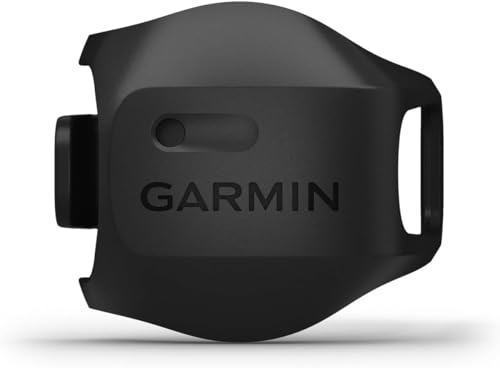 Garmin Speed Sensor 2 The sensor to buy if you want one that simply works everywhere: dual-band, magnet-free, honestly specified, and able to record a ride with no head unit attached at all. | Best speed sensor overall | 8.88.8 out of 10 | $67.44 · View on Amazon #ad We may earn a commission · Price as of November 24, 2026 |
| 2 | 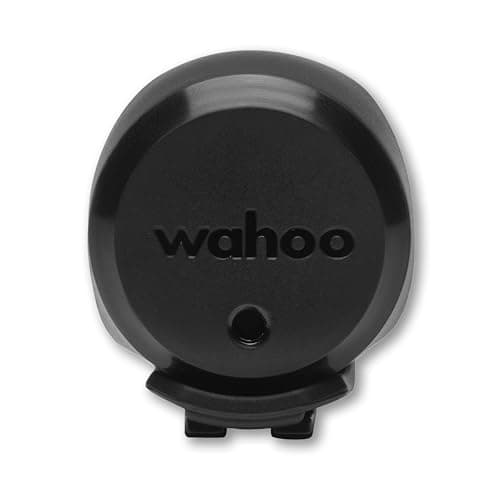 Wahoo TRACKR Speed Sensor The value pick among proper branded sensors: dual-band, magnet-free and tiny, for well under half the Garmin's price - as long as your bike has a real wheel hub for it to clamp to. | Best value from a name brand | 8.48.4 out of 10 | |
| 3 | 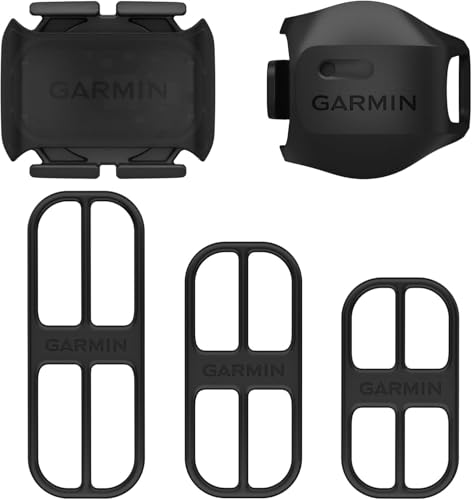 Garmin Bike Speed Sensor 2 and Cadence Sensor 2 Bundle The clean answer when you want both numbers: two separate dual-band Garmin sensors, no magnets, no compromise, and cheaper together than apart at our last check. | Best buy if you want speed and cadence together | 8.68.6 out of 10 | $119.99 · View on Amazon #ad We may earn a commission · Price as of November 24, 2026 |
| 4 | 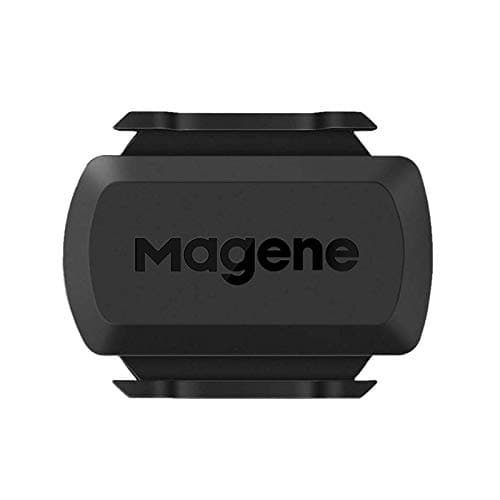 Magene S3+ Speed/Cadence Sensor The budget pick and the sensible first sensor: dual-band, switchable between speed and cadence, and cheap enough that buying a pair is still the cheapest way to get both numbers. | Budget pick: the dual-mode sensor worth owning | 8.18.1 out of 10 | |
| 5 | 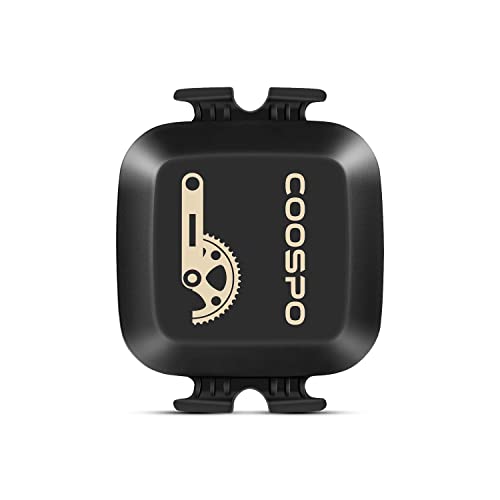 COOSPO BK467 Speed/Cadence Sensor The cheapest honest way to get both numbers: two dual-band sensors for less than one branded one, as long as you accept thinner published specifications and a fiddly mode switch. | Cheapest route to both speed and cadence | 7.97.9 out of 10 |
Here is the thing nobody says first about speed sensors: on a modern pain cave setup you probably do not need one. A smart trainer measures and broadcasts speed, cadence and power itself, and a sensor on the wheel would be measuring a wheel that is no longer there.
Where a speed sensor earns its place is everywhere else — and that turns out to be a lot of riders. A classic non-smart trainer with your own bike on it. A wheel-on trainer without electronics. An old bike that is never getting a power meter. Outdoor rides where you want distance that does not depend on GPS lock. And the Zwift setup that gets you riding for the price of a sensor instead of the price of a trainer.
First: does a wheel still turn when you ride?
Everything on this page follows from that one question, so answer it before you shop.
Yes — you ride outdoors, or on a wheel-on trainer. A speed sensor works, and it is the cheapest way to get real distance and speed data onto a screen. On a wheel-on trainer, fit it to the rear hub: that is the wheel the trainer spins. Wahoo pictures its sensor on a front hub, which is right for outdoor riding and wrong for a trainer, where the front wheel sits still in a riser block.
No — you ride a direct-drive smart trainer. Your rear wheel comes off and the trainer takes its place, so there is no hub to measure. Skip this page; the trainer reports speed already. Direct drive vs wheel-on trainers explains which you own.
No — you ride a spin bike or a Peloton. A flywheel is not a hub, and Wahoo states plainly that its TRACKR Speed is not compatible with spin bikes. What works on that kind of bike is a cadence sensor on the crank arm, which is a different product — cadence sensors for a stationary bike covers it.
One sensor cannot give you speed and cadence
This is the single most common mistake in this category, and the cheap sensors' marketing does not help. "Speed/cadence sensor" means the unit can be configured as either one. It does not mean it reports both at once.
The reason is physical rather than electronic: speed is wheel revolutions, measured at the hub, and cadence is crank revolutions, measured at the crank arm. Those are two places on the bike, so you need two sensors. On the COOSPO BK467 you pick the role by removing and reinserting the battery — red LED for speed, blue for cadence — and the Magene S3+ works the same way. Buy two if you want both numbers. Two cheap dual-mode sensors still cost less than one premium branded sensor.
How we ranked them
Dual-band connectivity first, and it is close to a pass/fail test. A sensor that speaks only Bluetooth cannot feed an ANT+ head unit, and a sensor that speaks only ANT+ needs a dongle to reach a phone or an Apple TV. Every pick here broadcasts both, because at these prices there is no reason to accept less. ANT+ vs Bluetooth for Zwift explains what each protocol can and cannot do, and ANT+ adapters covers the case where you are stuck with one.
Then install and calibration — magnet-free beats magnet-and-spoke every time, and being able to set wheel circumference properly is what separates accurate distance from approximately right distance. Then battery and durability, scored on published figures only: Garmin quotes about 12 months at an hour a day, Wahoo quotes up to 200 hours, and the two cheap sensors either publish nothing verifiable or publish three different numbers. Then value.
We have not lab-tested these sensors against a reference, and every figure on this page comes from the manufacturer's own published specification, which we have cited. How we review explains the method.
| Sensor | Bands | Mount | Published battery claim | Onboard storage | Does both speed + cadence? |
|---|---|---|---|---|---|
| Garmin Speed Sensor 2 | ANT+ and Bluetooth LE | Hub, either wheel | Approx. 12 mo at 1 hr/day | Up to 300 hr | No - speed only |
| Wahoo TRACKR Speed | ANT+ and Bluetooth | Hub, up to 40 mm | Up to 200 hr | No | No - speed only |
| Garmin Speed 2 + Cadence 2 bundle | ANT+ and Bluetooth LE | Hub + crank arm | Approx. 12 mo at 1 hr/day | Up to 300 hr (speed unit) | Yes - two sensors |
| Magene S3+ | ANT+ and Bluetooth | Hub or crank arm | None we could verify | No | No - one role at a time |
| COOSPO BK467 | ANT+ and Bluetooth | Hub or crank arm | 300 / 400 / 500 hr (COOSPO's pages disagree) | No | No - one role at a time |
The Zwift question: can you ride on a speed sensor alone?
Yes, and it is the cheapest entry into indoor training there is — with one caveat you should hear before you spend anything.
Zwift supports what it calls a classic trainer setup: you tell it which non-smart trainer you are using, it reads wheel speed from your sensor, and it estimates your power from the trainer's known resistance curve. That estimate is universally called zPower, and the important word is estimate. It depends on tire pressure, how tightly the roller is clamped to the tire, and tire temperature, none of which Zwift can see. It is fine for training consistency and useless for comparing yourself to anyone else.
So: a speed sensor plus an old bike plus a cheap wheel-on trainer gets you onto Zwift for very little money, and Zwift setup on a budget prices that route out properly — and the cheapest screen to put the result on is usually a monitor rather than a TV, which the best monitors for Zwift covers. If the numbers matter to you, the upgrade path is a real power source rather than a better speed sensor — smart trainer vs power meter is the decision to make next.
Getting the distance right
A speed sensor counts wheel revolutions. Distance is revolutions multiplied by wheel circumference, which means a wrong circumference gives you confidently wrong distance forever. Two things to do once:
Set your wheel size properly. On the Garmin sensors you can enter it in Garmin Connect or let an Edge self-calibrate it from GPS over a ride. If you are entering it by hand, measure rather than looking up a nominal figure: mark the tire and the floor, roll the bike one full revolution with your weight on it, and measure the distance. A 25 mm tire at road pressure is not the same rolling circumference as the chart says.
Re-check it when the tire changes. Swapping to a dedicated trainer tire changes circumference, and so does moving the sensor to a different wheel. It takes two minutes and it is the difference between a season of accurate mileage and a season of nonsense.
The verdict
Buy the Garmin Speed Sensor 2 if you want the one that works with everything and records rides on its own — it is the best sensor here and the easiest to live with. Buy the Wahoo TRACKR Speed Sensor if you want the same dual-band behavior for less than half the money and your bike has a hub under 40 mm. Buy the Garmin Speed and Cadence Sensor 2 bundle if you want both numbers from matched sensors in one box. Buy the Magene S3+ as the budget pick, or two of them to cover speed and cadence for less than one branded sensor. Buy the COOSPO BK467 if you want the absolute cheapest dual-band route and can live with a manufacturer that publishes three different battery figures.
And if you ride a direct-drive smart trainer: buy none of them. Your trainer already tells you everything a speed sensor could.
Need cadence rather than speed?
See the cadence sensors we rankThree neighbors worth reading before you commit: the best cadence sensors for the other half of the job, cadence sensor vs power meter if you are deciding where the next upgrade should go, and how to turn your bike into a stationary bike if the sensor is step one of a larger plan.
The full reviews
Every pick, in detail
#1 · Best speed sensor overall
Garmin Speed Sensor 2
8.88.8 out of 10#ad We may earn a commission · Price as of November 24, 2026
The sensor to buy if you want one that simply works everywhere: dual-band, magnet-free, honestly specified, and able to record a ride with no head unit attached at all.
- Connectivity
- ANT+ and Bluetooth Low Energy
- Mount
- Hub of either wheel, no magnets
- Battery
- User-replaceable CR2032, 3 V
- Battery life
- Approx. 12 months at 1 hr/day
- Onboard storage
- Up to 300 hr of activity data
- Water rating
- IEC 60529 IPX7
What we'd praise
- ANT+ and Bluetooth Low Energy together, so it talks to a bike computer, a watch, a phone and Zwift without an adapter
- Stretches over the hub with no magnet to align, which is the single biggest practical improvement over older speed sensors
- Stores up to 300 hours of activity data on its own, so it records rides even with no head unit present and syncs them later
- Garmin publishes a real battery figure - approximately 12 months at an hour a day on a user-replaceable CR2032
- Wheel size can be set in Garmin Connect or self-calibrated by an Edge or compatible Garmin device, so distance is right rather than roughly right
What we'd flag
- The most expensive single speed sensor here by a wide margin at our last price check
- It is a speed sensor only - cadence needs the separate Cadence Sensor 2 or the bundle below
- Garmin's manual pairs it with up to two Bluetooth devices and any number of ANT+ devices, so a crowded pain cave can run out of Bluetooth slots
- Useless on a direct-drive trainer, where there is no rear wheel for it to measure - that is a limit of the format, not the sensor
- The hub band is a stretch fit, so a very large or very unusually shaped hub shell can be a fight
The Speed Sensor 2 is the reference product in this category and the one we would buy without thinking hard about it. It stretches over a wheel hub, there is no magnet to line up, and it broadcasts ANT+ and Bluetooth Low Energy — which in practice means it pairs with a Garmin Edge, a Wahoo head unit, a watch, a phone and Zwift without an adapter or a workaround.
The feature that earns the price is the onboard memory. Garmin specifies up to 300 hours of activity storage, so the sensor logs wheel revolutions whether or not a head unit is listening and syncs the ride to Garmin Connect afterwards. For an indoor rider that is genuinely useful: you can ride a classic non-smart trainer with nothing but the sensor on the bike and still have a distance record.
Two honest limits. It is a speed sensor only, so cadence costs extra — see the bundle below, or our cadence sensor roundup. And on a direct-drive trainer the rear wheel comes off entirely, which makes a wheel speed sensor pointless; direct drive vs wheel-on trainers explains which one you have.
#2 · Best value from a name brand
Wahoo TRACKR Speed Sensor
8.48.4 out of 10The value pick among proper branded sensors: dual-band, magnet-free and tiny, for well under half the Garmin's price - as long as your bike has a real wheel hub for it to clamp to.
- Connectivity
- Bluetooth Smart and ANT+ dual band
- Mount
- Wheel hub, magnet-less
- Battery
- CR2032, up to 200 hours
- Weight
- 13 g (0.5 oz)
- Max hub diameter
- 40 mm
- Water rating
- IPX7
What we'd praise
- Dual-band Bluetooth and ANT+ at the same time, which is the specification that matters most and is often missing at this price
- Less than half the Garmin's price at our last check for the same core job
- 13 g and a 3.5 x 3.2 cm footprint, so it disappears on a hub rather than sitting on it
- Coin cell rather than a charger: Wahoo quotes up to 200 hours, and you never plug the sensor in
- Obvious choice if the rest of your pain cave is Wahoo, because it sits in the same app alongside the trainer and the TICKR
What we'd flag
- Wahoo states it is NOT compatible with spin bikes, so a Peloton or flywheel bike is out
- Maximum hub diameter is 40 mm, which rules out some deep-flange and dynamo hubs
- No onboard ride storage, so unlike the Garmin it needs something listening to be useful
- Up to 200 hours of battery is a lower claimed figure than Garmin's 12 months at an hour a day
- Wahoo lists the mount as the front wheel hub - for indoor use on a wheel-on trainer you want it on the rear, which works but is not what the packaging shows
Wahoo's TRACKR Speed does the same job as the Garmin for noticeably less money, and the one specification you should not compromise on is present: it broadcasts Bluetooth Smart and ANT+ at the same time, so a phone running Zwift and an ANT+ head unit can both see it. At 13 g with a 40 mm maximum hub diameter it is a genuinely small object.
The compatibility line that matters indoors is Wahoo's own: not compatible with spin bikes. A hub-clamp speed sensor needs a hub, and a spin bike or a Peloton has a flywheel housing instead. If that is your bike, a cadence sensor on the crank arm is the sensor you actually want — our guide to cadence sensors on a stationary bike covers that case properly.
The other honest gap against the Garmin is memory: there is none, so the TRACKR Speed needs a head unit, a watch or a phone listening or the ride is not recorded. Wahoo also quotes up to 200 hours of battery against Garmin's roughly 12 months at an hour a day, and both are coin cells you replace rather than charge.
#3 · Best buy if you want speed and cadence together
Garmin Bike Speed Sensor 2 and Cadence Sensor 2 Bundle
8.68.6 out of 10#ad We may earn a commission · Price as of November 24, 2026
The clean answer when you want both numbers: two separate dual-band Garmin sensors, no magnets, no compromise, and cheaper together than apart at our last check.
- Contents
- Speed Sensor 2 + Cadence Sensor 2
- Connectivity
- ANT+ and Bluetooth Low Energy
- Mounts
- Wheel hub (speed) and crank arm (cadence)
- Battery
- CR2032 each, user-replaceable
- Battery life
- Approx. 12 months at 1 hr/day
- Water rating
- IEC 60529 IPX7
What we'd praise
- Both sensors in one box, cheaper at our last check than buying the Speed Sensor 2 and Cadence Sensor 2 separately
- Two genuinely independent sensors, so you get speed AND cadence at the same time - which no single dual-mode sensor can do
- Same dual-band ANT+ and Bluetooth Low Energy broadcast on both units
- Both are magnet-free: the speed sensor stretches over the hub, the cadence sensor straps to the crank arm
- Matched battery behavior and matched firmware updates, so the pair is one thing to maintain rather than two
What we'd flag
- The most expensive item on this page by some distance at our last price check
- If you only ever ride indoors on a smart trainer, the trainer already reports both and this is money spent on nothing
- Two CR2032 cells to remember instead of one
- Still no use for wheel speed on a direct-drive trainer, where the cadence half is the only part that earns its keep
- Garmin sells more than one speed-and-cadence bundle, so check the listing you are on matches the Sensor 2 generation
This is the pick that resolves the question most riders actually have. Speed and cadence are measured in two different places — the wheel hub and the crank arm — and no single sensor can do both at once. The cheap dual-mode sensors further down this page switch between the two roles; they do not run both. If you want both numbers you need two sensors, and this is the two-sensor box.
Both units carry the same specification as the standalone Speed Sensor 2: ANT+ and Bluetooth Low Energy, a user-replaceable CR2032 with roughly a year of life at an hour a day, IPX7, and no magnets to align. The cadence sensor straps to a crank arm, which is also the reason it is the half of this bundle that still works when the rear wheel comes off for a direct-drive trainer.
Who should not buy it: anyone riding only a modern smart trainer. A smart trainer already broadcasts speed, cadence and power, and adding sensors duplicates data you have. Do you need a cadence sensor for Zwift goes through that case honestly.
#4 · Budget pick: the dual-mode sensor worth owning
Magene S3+ Speed/Cadence Sensor
8.18.1 out of 10The budget pick and the sensible first sensor: dual-band, switchable between speed and cadence, and cheap enough that buying a pair is still the cheapest way to get both numbers.
- Connectivity
- Bluetooth + ANT+
- Mount
- Crank arm or hub (dual mode)
- Battery
- CR2032 coin cell
- Modes
- Speed or cadence (switchable)
- Best for
- Value, flexibility
What we'd praise
- Dual-band Bluetooth and ANT+ at a price that normally buys a single-protocol sensor
- Switchable between speed and cadence, so one purchase covers whichever role your setup turns out to need
- Cheap enough to buy two and run speed and cadence together for a fraction of a branded bundle
- Coin cell, no charging, and the same magnet-free install as the expensive sensors
- Already the sensor we rank in our cadence roundup, so it is a known quantity rather than a gamble
What we'd flag
- One unit does speed OR cadence - not both at once - which catches people out
- Magene publishes less verifiable specification detail than Garmin or Wahoo, so there is no battery-hours figure we are willing to quote
- Build and finish are what the price suggests; this is not a 13 g precision object
- No onboard ride storage at all
- Support and firmware tooling are thinner than the big brands' if something goes wrong
The S3+ is the one that makes the cheap end of this category worth taking seriously, because it does the thing cheap sensors usually skip: it broadcasts both Bluetooth and ANT+. That is what lets it feed Zwift on a phone or an Apple TV and an ANT+ head unit, and it is the specification we would refuse to compromise on at any price.
The catch is the one shared by every dual-mode sensor here: it is speed or cadence, chosen at install, not both. That is a hardware limit, not a firmware one — a speed sensor counts wheel revolutions at the hub and a cadence sensor counts crank revolutions at the crank arm, and one object cannot be in both places. Buying two is the honest answer, and two of these still costs a fraction of a branded bundle.
What you give up: there is no published battery-hours figure we could verify, no onboard storage, and the build is ordinary. Our Zwift cadence sensor roundup covers how it behaves in the cadence role, which is the one most indoor riders will use it in.
#5 · Cheapest route to both speed and cadence
COOSPO BK467 Speed/Cadence Sensor
7.97.9 out of 10The cheapest honest way to get both numbers: two dual-band sensors for less than one branded one, as long as you accept thinner published specifications and a fiddly mode switch.
- Connectivity
- Bluetooth and ANT+ dual mode
- Mount
- Wheel hub (speed) or crank arm (cadence)
- Mode switch
- Reinstall the battery - red = speed, blue = cadence
- Battery
- Replaceable CR2032
- Water rating
- IP67
- Operating range
- -10 to 50 C (per COOSPO)
What we'd praise
- The cheapest dual-band sensor we would actually recommend, and the listing offers single and two-pack options so a speed-plus-cadence pair stays very cheap
- COOSPO names Zwift, Rouvy and Peloton compatibility on the listing, which is the software most indoor riders care about
- IP67 and a quoted -10 to 50 C operating range, which covers a cold garage in January
- Around 9 g on COOSPO's own figures, so it is as unobtrusive as the branded sensors
- Mode is switched by reinstalling the battery and confirmed by an LED color, so you can tell which role a unit is in without an app
What we'd flag
- One unit is speed OR cadence, never both, exactly like the Magene
- COOSPO's own pages quote three different battery figures - 300, 400 and 500 hours - so we are not going to state one as fact
- Its published dimensions and weight also differ between COOSPO's product page and its comparison page, which is not reassuring
- No onboard ride storage
- Mode switching by battery reinstallation is fiddly in practice, and nothing on the unit labels which mode it is in once the LED stops flashing
If the goal is speed and cadence into Zwift for as little money as possible, the BK467 is the pick. It is dual mode and dual band, COOSPO names Zwift, Rouvy and Peloton on the listing, and the single and two-pack options mean a complete speed-plus-cadence setup costs less than one Garmin sensor.
The mode switch is worth understanding before you buy, because it is the part people get wrong. One unit is either a speed sensor on a wheel hub or a cadence sensor on a crank arm, and you choose which by taking the battery out and putting it back in: COOSPO's documentation says a red light means speed mode and a blue light means cadence. Set it once, mount it, and leave it.
Why it is not higher: COOSPO's own pages give three different battery-life claims for this sensor — 300, 400 and 500 hours depending which page you read — and its published dimensions disagree between pages too. We will not state a battery figure we cannot pin down, and that kind of inconsistency is exactly the difference between a cheap sensor and a Garmin. ANT+ vs Bluetooth for Zwift explains why the dual-band part still matters more than any of it.
Good questions
Frequently asked questions
What is the best bike speed sensor?
The Garmin Speed Sensor 2. It broadcasts ANT+ and Bluetooth Low Energy so it works with head units, watches, phones and Zwift without an adapter, it stretches over a wheel hub with no magnet to align, and Garmin specifies up to 300 hours of onboard activity storage so it records rides even with no head unit present. The Wahoo TRACKR Speed Sensor does the same core job for well under half the price, and the Magene S3+ is the budget pick.
Do you need a speed sensor if you have a smart trainer?
No. A smart trainer measures and broadcasts speed, cadence and power itself, and on a direct-drive trainer your rear wheel is off the bike entirely so there is nothing for a wheel speed sensor to measure. A speed sensor is for riders on a classic non-smart trainer, a wheel-on trainer without electronics, or outdoors where you want distance that does not depend on a GPS lock.
Can one sensor measure both speed and cadence?
Not at the same time. Speed is wheel revolutions measured at the hub and cadence is crank revolutions measured at the crank arm, so a single unit cannot be in both places. Sensors sold as speed/cadence sensors, like the Magene S3+ and the COOSPO BK467, let you configure which role the unit performs - on the BK467 you switch by reinstalling the battery, with a red light for speed and blue for cadence. To get both numbers you need two sensors.
Can you use a speed sensor to ride Zwift?
Yes. Zwift supports a classic trainer setup where it reads wheel speed from your sensor and estimates power from the known resistance curve of the non-smart trainer you select. That estimate is called zPower, and it is affected by tire pressure, roller tension and tire temperature, none of which Zwift can see. It is fine for consistent training and not reliable for comparing yourself with other riders.
Where does a speed sensor go on a wheel-on trainer?
On the rear wheel hub, because the rear wheel is the one the trainer spins. This is worth saying because Wahoo's own product page shows the TRACKR Speed on a front wheel hub, which is correct for outdoor riding and wrong indoors - on a trainer the front wheel sits still in a riser block. Garmin states its sensor can be fitted to the hub of either wheel.
Do speed sensors need magnets?
Not any of the ones on this page. Every pick here is a magnet-less design that fits over the wheel hub and senses rotation internally, so there is nothing to align with a spoke and nothing to slip out of position. Older speed sensors used a fork-mounted pickup and a spoke magnet, which is the arrangement that made the category irritating in the first place.
How long does a speed sensor battery last?
It depends on the sensor and the figures vary a lot. Garmin specifies approximately 12 months at one hour a day on a user-replaceable CR2032 for the Speed Sensor 2. Wahoo quotes up to 200 hours for the TRACKR Speed, also on a CR2032. COOSPO's own pages quote 300, 400 and 500 hours for the BK467 depending which page you read, so we are not willing to state one figure as fact, and we found no verifiable battery figure for the Magene S3+.
How we sourced this
- Garmin — Speed Sensor 2 and Cadence Sensor 2 specifications (battery, storage, water rating)
- Garmin — Speed Sensor 2 product page (ANT+ and Bluetooth LE, hub mount, calibration)
- Garmin — Bike Speed Sensor 2 and Cadence Sensor 2 Bundle
- Wahoo Fitness — TRACKR SPEED product page (weight, battery, hub diameter, spin bike note)
- COOSPO — BK467 speed/cadence sensor product page (dual mode, IP67, compatibility)
- COOSPO — cadence and speed sensor FAQ (battery-life claims)
Keep going