Accessory Review
Wahoo Kickr Climb Review: The Accessory That Moves You
It raises and lowers the front of your bike to match the terrain. Here is what that changes, what it costs, and the order in which it should appear on your list.

The Kickr Climb is the most divisive accessory in indoor cycling, and both sides of the argument are right. It is a motorized front-wheel replacement that pitches your bike up on climbs and down on descents, following the gradient in Zwift automatically. It is beautifully made, genuinely transforms how a long climb feels, and improves no measurable thing about your training whatsoever. This review is about deciding which of those facts matters more to you.
What it actually does
Your front wheel comes off and the fork clamps into the Climb's carriage. When Zwift reports a gradient, the Climb drives the front of the bike up or down to match it, in real time, without you touching anything. There is also a handlebar-mounted remote for manual control, which is more useful than it sounds — being able to raise the front for a stretch mid-session is a small, real quality-of-life feature.
Two secondary benefits come free. It replaces a front wheel riser block entirely, so your bike sits level rather than nose-down. And because your front wheel is off the bike, there is no front tire sitting on a block collecting rubber dust and no wheel to store.
Does changing position actually change the workout?
Yes, though not in a way that shows up on a power file. Riding at a real climbing angle shifts your weight rearward and changes hip angle, which alters the balance between quadriceps and glutes and hamstrings. Riders who use one consistently report that steep simulated climbs feel more like outdoor climbing and that their lower back and hips feel different afterwards.
We want to be careful here, because this is exactly the kind of claim that gets inflated. No manufacturer claims and no evidence we can cite shows that a gradient simulator produces better training adaptation than the same workout on a level bike. What it plausibly does is improve the specificity of climbing sessions and reduce the postural monotony of long indoor rides. Both are real. Neither is a performance upgrade you can measure.
| With Kickr Climb | Without | |
|---|---|---|
| Bike angle on climbs | Rises with the gradient | Level, or nose-down on a riser |
| Muscle recruitment on climbs | Shifts with position | Constant |
| Power accuracy | Unchanged | Unchanged |
| Resistance on climbs | Unchanged — the trainer does that | Same |
| Front wheel | Removed | On a riser block |
| Floor space needed | More | Less |
| Trainer compatibility | Compatible Wahoo Kickr trainers | Any |
Compatibility is the thing to check first
The Climb is a Wahoo accessory designed to work with compatible Wahoo Kickr trainers. It is not a universal accessory, and it will not work with a Tacx Neo 2Tor an Elite trainer. Before buying either the Climb or a trainer you hope to pair it with, check the current compatibility list on Wahoo's own site — the supported model range has shifted across Kickr generations.
This ecosystem lock is a genuine strategic consideration. If a Climb is on your long-term wish list, that is a real reason to choose a Wahoo trainer in the first place, and we call it out in our Kickr Core vs Neo 2T comparison. If you already own a non-Wahoo trainer, this accessory is simply not available to you. And if you want the tilt without a trainer at all, the Wahoo Kickr Bike Pro builds it into the frame; our Kickr Bike Pro review weighs that against a Kickr v6 with a Climb.
Living with it
Setup is straightforward: remove the front wheel, fit the appropriate axle adapter, clamp the fork into the carriage, plug the unit in and pair it with the trainer. Wahoo supplies adapters for the common axle standards; check yours before ordering if you ride an unusual thru-axle.
Day to day, the main adjustment is spatial. The Climb sits in front of the trainer and the bike moves through a meaningful arc, so a trainer desk placed too close will foul the bars at full climb. Set the desk position with the front raised, not lowered, and leave clearance. Cable and hose routing also needs a glance — a bike that pitches up and down will tug at anything tethered to it.
The honest value argument
A Kickr Climb costs about what a good mid-tier direct-drive trainer costs. So the question is not "is it good?" — it is — but "is this the best use of that money in my setup?"
For almost everyone the answer is no, until the fundamentals are done. In rough order of return per dollar: a controllable trainer, a strong fan, a mat, a screen at eye level, a heart rate strap, a second fan, and only then a gradient simulator. If any of those earlier items is still missing, the Climb is the wrong purchase and you will feel it. Our pain cave setup guide lays out that order in full.
Once the fundamentals are handled, though, the calculus changes. The Climb is one of the few upgrades left that changes the experience rather than the numbers, and for a rider who spends real hours indoors over a winter, changing the experience is what keeps the hours happening.
Not sure what to buy first?
See the full accessory priority listWho should buy it
Buy the Kickr Climb if you already own a compatible Wahoo trainer, your room is otherwise finished, you ride long simulated climbs, and you want indoor riding to feel less like a stationary chore. It delivers exactly what it promises, and it is well enough made that it will outlast the trainer it is attached to.
Skip it if you own a non-Wahoo trainer, if your fan is inadequate, if you have no mat, or if you train mostly with structured ERG intervals — where you barely notice terrain at all, because the trainer is holding a fixed wattage regardless of what the screen says the road is doing.
The full reviews
Every pick, in detail
Best gradient simulator
Wahoo Kickr Climb
8.28.2 out of 10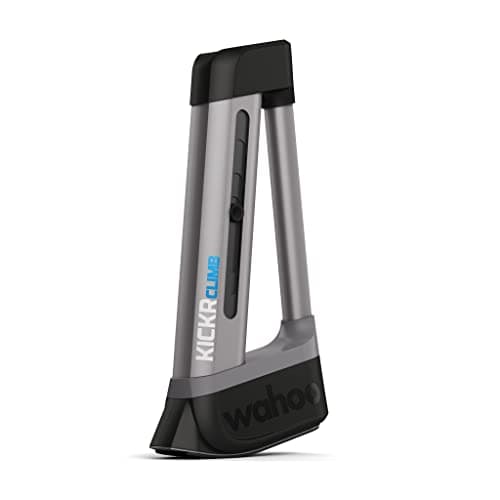
The best immersion accessory in indoor cycling, and the clearest example of a want rather than a need.
- Type
- Gradient simulator
- Function
- Raises and lowers the front of the bike
- Control
- Automatic, follows the app gradient
- Compatibility
- Compatible Wahoo Kickr trainers
- Install
- Replaces the front wheel
- Manual mode
- Remote up and down control
What we'd praise
- Changes your position on climbs and descents, which changes which muscles carry the load
- Fully automatic in Zwift — it follows the terrain with no input from you
- Replaces the front wheel entirely, so it doubles as a riser block and removes tire wear at the front
- Genuinely well built, and the manual remote is useful for stretching mid-ride
What we'd flag
- Costs as much as a good mid-tier trainer and improves no metric whatsoever
- Only works with compatible Wahoo trainers, which locks you into one ecosystem
- Takes up meaningful floor space in front of an already large setup
The Climb replaces your front wheel with a motorized post that raises and lowers the front of the bike to match the gradient in Zwift. On a 10% simulated climb, the front of your bike rises; on a descent, it drops. It is the only accessory in indoor cycling that changes your body position rather than your data.
That matters more than it sounds, because position determines which muscles carry the load. A climb ridden at a climb's angle recruits differently from a climb ridden on a level bike, and long rides feel less monotonous when your position changes with the terrain. What it does not do is add a single watt or a single data field.
Good questions
Frequently asked questions
What does the Wahoo Kickr Climb actually do?
It replaces your front wheel with a motorized carriage that raises and lowers the front of the bike to match the gradient shown in an app such as Zwift. Your position changes with the terrain, which changes muscle recruitment on climbs, but it does not alter resistance or your power data.
Which trainers work with the Kickr Climb?
It is designed to work with compatible Wahoo Kickr trainers only. It does not work with Tacx, Elite or other brands. Because supported models have varied across Kickr generations, check the current compatibility list on Wahoo's site before buying either the Climb or a trainer to pair with it.
Does the Kickr Climb change resistance on climbs?
No. Resistance is handled entirely by the trainer, exactly as it would be without a Climb attached. The Climb changes the physical angle of the bike, which changes your position and how the effort feels, but it adds no resistance and changes no recorded number.
Do I still need a front wheel riser block with a Kickr Climb?
No. The Climb replaces the front wheel entirely and supports the fork directly, so it does the riser block's job and more. That also means no front tire sitting on a block, and one fewer wheel to store during the indoor season.
Is the Kickr Climb worth the money?
Only once the fundamentals are handled. It costs about as much as a good mid-tier trainer and improves no measurable aspect of your training. If your trainer, fan, mat and screen are all sorted and you ride long climbs indoors, it is the best immersion upgrade available.
Does the Kickr Climb work with ERG workouts?
It functions, but you will barely notice it. In ERG mode the trainer holds a fixed target wattage regardless of terrain, so gradient changes have little meaning. The Climb is most valuable during free riding and route-based sessions where the simulated terrain drives the ride.
How we sourced this
Keep going
Read these next
- Gift GuideGifts for the Cyclist Who Has Everything
- Indoor SetupPain Cave Setup Ideas
- AccessoriesThe Best Trainer Desks
- TrainersKickr Core vs Tacx Neo 2T
- AccessoriesIndoor Cycling Accessories Checklist
- AccessoriesThe Best Front Wheel Riser Blocks
- TrainersWahoo Kickr Move Review
- TrainersWahoo Kickr Bike Pro Review